
Classification: TLP:CLEAR
Platform Tested: Windows 11 Pro 24H2
EDR Tested: Commercial EDR Solution, Windows Defender
MITRE ATT&CK Techniques: 14 mapped
Detection Queries: 42 (38 CQL + 4 FQL)
Telemetry Analyzed: 8,562 SIEM events (two exports) + 50,529 Sysmon events
1. Executive Summary
On February 23, 2026, Tammy Harper raised with the Ransom-ISAC community of a new ransomware payload utilising User Access Control (UAC) bypass and Bring Your Own Vulnerable Driver (BYOVD) techniques. The same day, we detonated it - VEN0m - an open-source Rust-based ransomware that weaponizes a signed IObit driver to shred antivirus installations from disk — against two endpoint security configurations. Against Windows Defender on a fully-patched Windows 11 Pro 24H2 system, VEN0m completed its entire 9-phase attack chain undetected: UAC bypass, kernel driver load, AV file deletion, Winlogon persistence, AES-256-GCM encryption of user files, scheduled task registration, and ransom note delivery. Against a commercial EDR solution with vulnerable driver protection enabled, the attack chain collapsed 127 milliseconds after it began, stopped by a single behavioral detection that identified a vulnerable driver written to a user-writable directory. This report documents both outcomes, dissects the attack at the source code level, provides 42 behavioral detection queries, and demonstrates that the encryption key is trivially recoverable from a forensic artifact the ransomware creates by design.
Figure 1: VEN0m payload from xM0kht4r on GitHub
1.1 Key Findings
- Open-source BYOVD ransomware: VEN0m combines CVE-2025-26125 (IObit ForceDelete.sys) with AES-256-GCM encryption in a single 15.1 MB Rust binary, demonstrating a fully weaponized BYOVD-to-ransomware kill chain
- Windows Defender bypass confirmed: The payload executed all 9 phases undetected on Windows 11 Pro 24H2 with current Defender definitions
- Commercial EDR prevention: The EDR solution's vulnerable driver protection quarantined the BYOVD driver in ~127ms, collapsing the entire downstream attack chain — zero files encrypted, zero persistence established
- 8,562 SIEM events + 50,529 Sysmon events analyzed across multiple detonations, enabling full attack timeline reconstruction and behavioral detection development
- Encryption key is trivially recoverable: The AES-256 key is a hardcoded plaintext ASCII string in the PE
.rdatasection, recoverable from the persistence binary viastringsin under 60 seconds - 42 behavioral detection queries developed across 9 attack phases — designed to catch VEN0m variants and other BYOVD-ransomware families, not just this specific sample
- Complete IR playbook included with containment, key recovery, eradication, and hardening procedures
1.2 Audience Guide
SOC / Incident Response Teams: Start with Section 4 (Attack Chain), then Section 6 (IOCs), Section 8 (Detection Queries), and Section 7 (Key Recovery).
CISO / Leadership: Focus on Section 1 (Executive Summary), Section 3 (EDR Comparison), and Section 10 (IR Playbook).
Security Researchers: Dive into Section 4 (Attack Chain), Section 9 (Source Code Analysis), and Section 7 (Encryption Details).
1.3 Glossary
- AES / AES-256-GCM: Advanced Encryption Standard. AES-256-GCM is AES with a 256-bit key in Galois/Counter Mode, which provides both encryption and integrity (via an authentication tag).
- BYOVD: Bring Your Own Vulnerable Driver — attacker drops a legitimate signed but vulnerable kernel driver to gain kernel capabilities (e.g., arbitrary file deletion).
- EDR: Endpoint Detection and Response — endpoint agent + telemetry + detections + response actions.
- GCM authentication tag: Integrity value (16 bytes here) that must verify during decryption; if the tag check fails, the key or ciphertext is wrong.
- IOC(s): Indicator(s) of Compromise — artifacts that can be used to detect an intrusion (hashes, filenames, registry keys, etc.).
- IOCTL: I/O Control code — a numeric command sent from user mode to a device/driver (typically via
DeviceIoControl) to request an operation. - IR: Incident Response — the process of containing, eradicating, and recovering from an intrusion.
- IRP: I/O Request Packet — the kernel structure Windows uses to represent an I/O operation as it moves through the driver stack.
- MDE: Microsoft Defender for Endpoint — Microsoft's enterprise EDR product (distinct from the built-in Windows Defender AV components).
- NTFS: New Technology File System — Windows filesystem; includes artifacts like
$MFTused for forensic recovery. - PE: Portable Executable — Windows executable format (
.exe,.dll,.sys). - SIEM: Security Information and Event Management — centralized log collection/search/correlation platform.
- Sysmon: Windows System Monitor (Sysinternals) — generates detailed Windows event logs for process, network, file, and registry activity.
- UAC: User Account Control — Windows elevation mechanism separating standard and elevated privileges.
- VPB: Volume Parameter Block — a kernel structure that represents a mounted volume and helps relate a file object to its underlying device/volume.
2. Threat Overview
2.1 What is VEN0m Ransomware?
VEN0m is an open-source proof-of-concept ransomware written entirely in Rust, published on GitHub under the GPL-3.0 license. It represents a complete ransomware toolkit that combines well-documented attack techniques into a single automated binary.
| Attribute | Value |
|---|---|
| Language | Rust (100%) |
| Source | https://github.com/xM0kht4r/VEN0m-Ransomware |
| Author | xM0kht4r ([email protected]) |
| License | GPL-3.0 |
| Source Files | 14 Rust files (~25KB total source) |
| Binary Size | 15,557,100 bytes (15.1 MB) |
| Build Targets | 3 — VEN0m (payload), note (ransom GUI), Antid0te (decryptor) |
| Key Dependencies | winapi, aes-gcm, winreg, windows-service, eframe/egui |
The binary is large (15.1 MB) because it embeds three artifacts at compile time via Rust's include_bytes! macro:
- IMFForceDelete.sys — the vulnerable IObit kernel driver (20,856 bytes)
- note.exe — the ransom note GUI binary
- wallpaper.jpg — the ransomware desktop wallpaper image
2.2 Why VEN0m Matters
The tactical reality: VEN0m demonstrates that a single binary, armed with a legitimately signed but vulnerable driver that is not on Microsoft's driver blocklist, can bypass Windows Defender on a current, fully-patched Windows 11 system. The CVE-2025-26125 driver carries a valid IObit signature, allowing it to pass driver signing enforcement. Once loaded into the kernel, it provides arbitrary file deletion that no usermode security product can intercept.
The operational gap: Many organizations rely on native OS defenses as their primary endpoint protection. VEN0m exposes the gap between "we have antivirus" and "we have behavioral detection." Every security control that VEN0m bypasses — Defender's real-time protection, User Account Control, driver signing enforcement — is a control that organizations commonly consider sufficient.
The strategic concern: Open-source ransomware toolkits lower the barrier to entry. The techniques in VEN0m — BYOVD, Winlogon persistence, slui.exe UAC bypass — are individually well-documented in security research. VEN0m's contribution is combining them into a single automated Rust binary that a moderately skilled operator can compile and deploy. The source code serves as a template for variants.
2.3 Scope of This Analysis
| Parameter | Value |
|---|---|
| Test Environment | Isolated Windows 11 Pro 24H2 VM |
| Hostname | [LAB-HOST] |
| User Account | Forensics |
| Test Scenario 1 | Windows Defender only (all other EDR disabled) |
| Test Scenario 2 | Commercial EDR solution (all modules and prevention policies active) |
| Source Code Review | All 14 Rust source files analyzed line-by-line |
| PE Analysis | .rdata section extraction and string analysis |
| SIEM Telemetry | Two EDR SIEM exports: 7,951 events (Run 1) + 611 events (Run 2) |
| Sysmon Telemetry | 50,529 events across both detonations (Event IDs 1, 11, 12, 13, etc.) |
| EDR API | Detection details, host containment status, quarantine data |
| Detonations | 2 with commercial EDR active, 1 with Windows Defender only |
3. EDR Comparison: The 127-Millisecond Difference
3.1 Windows Defender: Complete Bypass
VEN0m executed its complete 9-phase attack chain against Windows Defender on Windows 11 Pro 24H2 without triggering a single alert. All phases completed successfully:
- UAC bypass via slui.exe DelegateExecute hijack — undetected
- BYOVD driver dropped to %TEMP% and loaded into kernel — undetected
- AV/EDR files force-deleted via kernel IOCTL — undetected
- Persistence binary copied to %LOCALAPPDATA% — undetected
- Winlogon Userinit registry modified — undetected
- User files encrypted with AES-256-GCM — undetected
- Scheduled task created for ransom note — undetected
- Ransom note GUI displayed with input blocking — undetected
- Desktop wallpaper changed — undetected
The Sysmon event log confirmed the payload ran with IntegrityLevel: High, verifying that the UAC bypass succeeded at the OS level. Windows Defender produced no alerts, no quarantine actions, and no behavioral detections throughout the entire attack chain.
3.2 Commercial EDR: Attack Chain Collapsed
When the same payload was detonated with a commercial EDR solution active, the attack chain was halted at Phase 2 — the BYOVD driver drop. The EDR's vulnerable driver protection identified the IObit ForceDelete.sys driver in its vulnerable driver database and quarantined it approximately 127 milliseconds after it was written to disk.
3.2.1 Attack Timeline (Reconstructed from SIEM + Sysmon Telemetry)
The following timeline is corroborated across two independent data sources: EDR SIEM telemetry (7,951 events) and Sysmon (50,529 events). A second detonation (Run 2, 11:52 UTC) produced identical results, confirming reproducibility.
| Time (UTC) | Source | Event | Details |
|---|---|---|---|
| 02:22:42 | Sysmon | FileCreate | VEN0m.exe, note.exe, Antid0te.exe extracted to Desktop by explorer.exe |
| 02:22:50 | Sysmon+SIEM | ProcessRollup2 | VEN0m.exe executed (PID 4656, IntegrityLevel: High, parent: explorer.exe) |
| 02:22:50 | SIEM | ProcessRollup2 | conhost.exe spawned as child of VEN0m.exe |
| 02:22:50 | SIEM | AssociateIndicator | EDR ML detection fires on VEN0m.exe |
| 02:22:52 | Sysmon+SIEM | NewExecutableWritten | Driver dropped: MicrosoftUpdate11.01.sys to %TEMP% (OriginalFilename: ForceDelete.sys, IObit) |
| 02:22:52 | Sysmon | RegistryEvent (EID 13) | services.exe creates HKLM\..\Services\MicrosoftUpdate11.01 — Start=2 (AutoStart), ImagePath=\??\...\MicrosoftUpdate11.01.sys |
| 02:22:52 | SIEM | QuarantinedFile | EDR quarantines driver (~2s after process start) |
| 02:22:52 | Sysmon | ProcessTerminate | VEN0m.exe terminates (~2s total runtime) |
| 02:23:07 | SIEM | EppDetectionSummaryEvent | Formal alert: "Evade Detection" — Severity: High (70), PatternId 10512 |
| 02:23:10 | SIEM | RemoteResponseSession | Automated remote response sessions opened by EDR SOAR workflow |
| 02:23:22 | Sysmon | ProcessCreate (EID 1) | note.exe launched manually by tester (parent: explorer.exe, not schtasks) |
| 02:23:44 | SIEM | NetworkContainmentCompleted | Host network-isolated by automated SOAR workflow |
| 02:23:54 | Sysmon | ProcessTerminate | note.exe terminates after 32s (auto-close timer) |
Note on note.exe: The flashing ransom note observed during testing was from a manual launch of note.exe from the extracted folder — not from a dropped @[email protected] or a scheduled task. The EDR's intervention at Phase 2 prevented VEN0m from reaching task::register(), which is responsible for writing @[email protected] and creating the scheduled task.
3.2.2 What the EDR Blocked
| Blocked Action | Why |
|---|---|
| Driver load into kernel | Quarantined MicrosoftUpdate11.01.sys before service could start it |
| AV/EDR shredding | No driver handle = no IOCTL = no force-delete capability |
| File encryption | Zero .vnm files created |
| Ransom note drop | @[email protected] never written to Desktop |
| Winlogon Userinit persistence | Registry key not modified |
| Scheduled task creation | schtasks.exe never executed |
| Wallpaper change | Never reached in execution flow |
3.2.3 What the EDR Allowed (Residual Artifacts Requiring Manual Cleanup)
| Allowed Action | Residual Artifact | Cleanup Required |
|---|---|---|
| VEN0m.exe process creation | VEN0m.exe binary remains at original execution path | Yes — delete or quarantine manually |
Driver file write to %TEMP% | File quarantined, but quarantine copy persists in EDR quarantine directory | No — already neutralized |
| Service registry creation | HKLM\SYSTEM\ControlSet001\Services\MicrosoftUpdate11.01 persists with Start=2 (AutoStart) and ImagePath pointing to the now-missing .sys file | Yes — must be manually removed |
| note.exe execution | Separate manual launch by tester (not part of automated chain) | N/A |
Critical note for responders: The EDR's automated response quarantines the driver file and network-contains the host, but it does not perform artifact cleanup. The orphaned service registry key (MicrosoftUpdate11.01) persists with AutoStart configuration. While the service will fail to load on reboot (the driver file is gone), the registry entry is an IOC that must be manually removed during eradication. See Section 10.3 for complete cleanup procedures.
3.2.4 EDR Automated Response Actions
The EDR's response was confirmed across two detonations and corroborated by both SIEM and Sysmon telemetry:
| Action | Timing | Automated? |
|---|---|---|
| ML detection fires on VEN0m.exe | Immediate (process start) | Yes |
Driver quarantined (VulnerableDriverWrittenHigh) | ~2s after process start | Yes |
| VEN0m.exe binary uploaded to cloud for analysis | ~2s (LfoUpload) | Yes |
| EPP detection summary published | ~17s | Yes |
| Remote response sessions opened by automated SOAR workflow | ~20s | Yes (SOAR) |
| Host network-contained | ~54s | Yes (SOAR) |
| Kill VEN0m.exe process | — | No (process self-terminated) |
| Delete VEN0m.exe from disk | — | No |
| Remove service registry key | — | No |
| Clean UAC bypass registry | — | No |
| Delete %TEMP% artifacts | — | No |
The EDR's philosophy: stop the active threat and isolate the host for manual IR — not automated full remediation. Responders must still perform the eradication steps in Section 10.3.
Key Insight: The EDR's vulnerable driver protection identified the IObit ForceDelete.sys driver (CVE-2025-26125) in its vulnerable driver database. By quarantining the driver before it could load into the kernel, the EDR removed VEN0m's ability to shred AV/EDR installations — the prerequisite for every subsequent phase. A single behavioral detection collapsed the entire 9-phase attack chain. Without the BYOVD capability, VEN0m cannot disable security products, and the encryption routine either fails or is caught by standard behavioral monitoring. This result was reproduced identically on a second detonation (11:52 UTC, same day).
3.3 Detection Details
| Attribute | Value |
|---|---|
| Detection Name | VulnerableDriverWrittenHigh |
| Scenario | Evade Detection |
| Severity | High (70/100) |
| Risk Score | 55 |
| Disposition | Detection/Quarantine attempted |
| Quarantine Result | Successful |
| MITRE Mapping | TA0005 / T1562.001 (Defense Evasion / Disable or Modify Tools) |
| Key Signal Events | FileWrittenWithEntropyHigh (28), RansomwareOpenFile (2), CreateService (4), AsepValueUpdate (54) |
3.4 How the Driver Allows File Deletion
IObit is a Chinese software company based in Chengdu that makes consumer PC utilities — "speed up your PC" type products. Their main products are things like system cleaners, driver updaters, and a basic antimalware tool called IObit Malware Fighter.
That's where this driver comes from. IObit Malware Fighter needed a way to force-delete stubborn malware files that couldn't be removed normally (locked files, protected files, etc.), so they wrote a kernel driver to do it. They signed it with their DigiCert EV certificate, shipped it with their product, and never added access controls to restrict who could use it. That oversight became CVE-2025-26125.
Any process on the system — ransomware, a Python script, notepad if you could make it call DeviceIoControl — can open \\.\IMFForceDelete123, send IOCTL 0x8016E000 with any file path, and the driver will delete it at kernel level. No identity check, no signature check, no path validation.
CVE-2025-26125 is essentially: IObit built a kernel-level delete-anything service and left the front door wide open. The fix would have been a single validation check — verify the caller is IObit's own signed process before executing the IOCTL. They didn't add one.
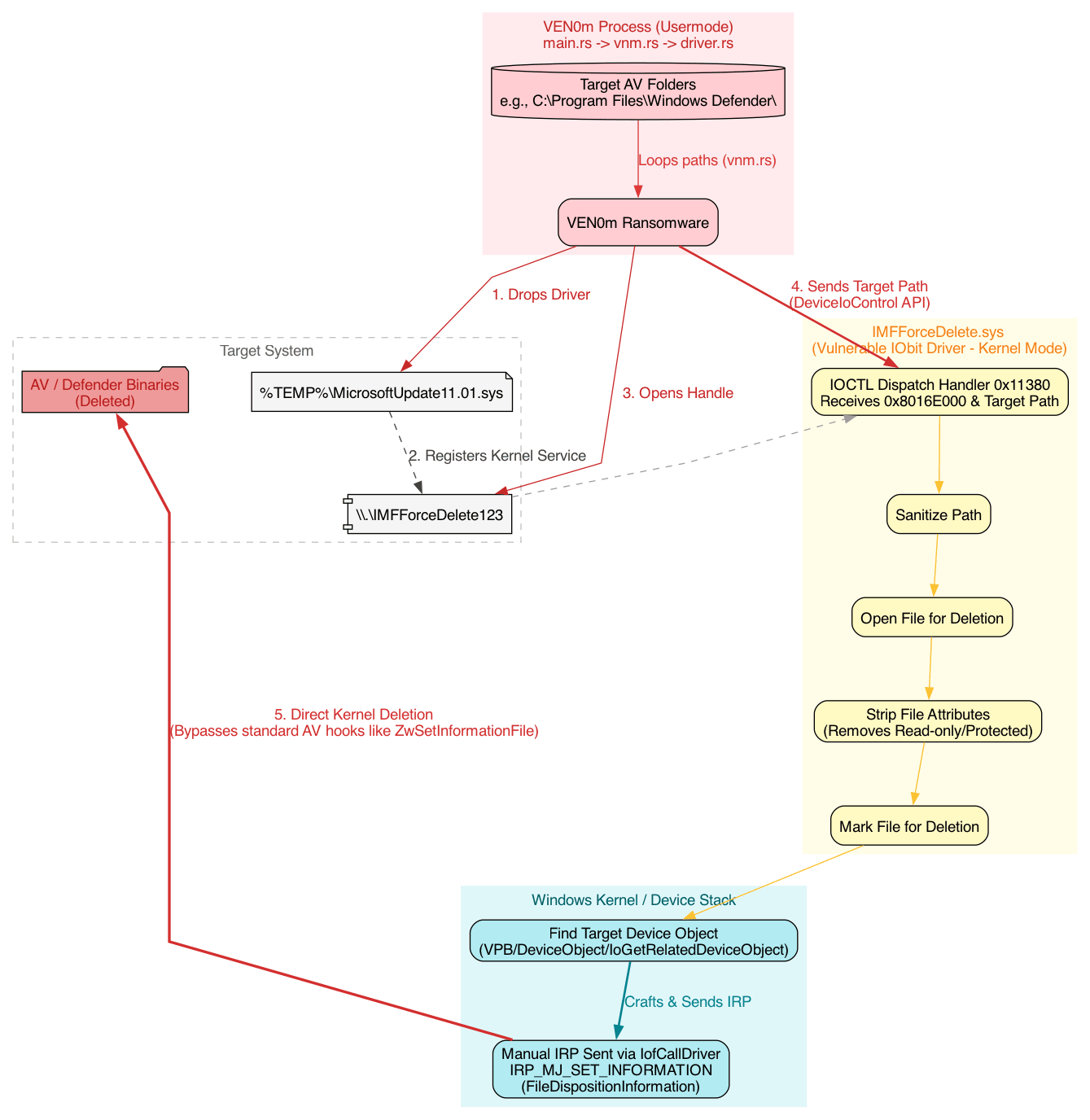
Figure 2: Secure vs vulnerable IOCTL dispatch behavior in a BYOVD driver. In a secure design, the driver verifies the caller is an authorized, vendor-signed process before honoring dangerous IOCTLs. In CVE-2025-26125, any user-mode process that can open the device can trigger kernel-mode deletion.
3.4.1 Why BYOVD drivers are vulnerable (high level)
BYOVD works because the driver is trusted by Windows (it is legitimately signed) but the driver does not sufficiently authenticate who is allowed to use it.
In a secure implementation, the IOCTL handler typically includes a "deny foreign callers" gate, such as:
- Verify the caller's code signature (publisher / certificate chain) before servicing privileged IOCTLs.
- Verify the caller's process identity (expected image path, protected service, or a strong identity bound to the vendor's product).
- Enforce an allowlist and reject anything else.
In the vulnerable pattern shown here, the dispatch logic effectively becomes:
- If IOCTL code matches the delete primitive, perform the kernel operation.
- Otherwise, return.
Because there is no caller verification step (no code-signing check and no "only IObit process names can do this" logic), malware can:
- Drop the signed driver.
- Open
\\.\IMFForceDelete123. - Send IOCTL
0x8016E000with an arbitrary target path. - Get a kernel-mode delete that bypasses many user-mode inspection points.
That missing identity check is what turns a legitimate signed utility driver into a reusable attacker primitive.
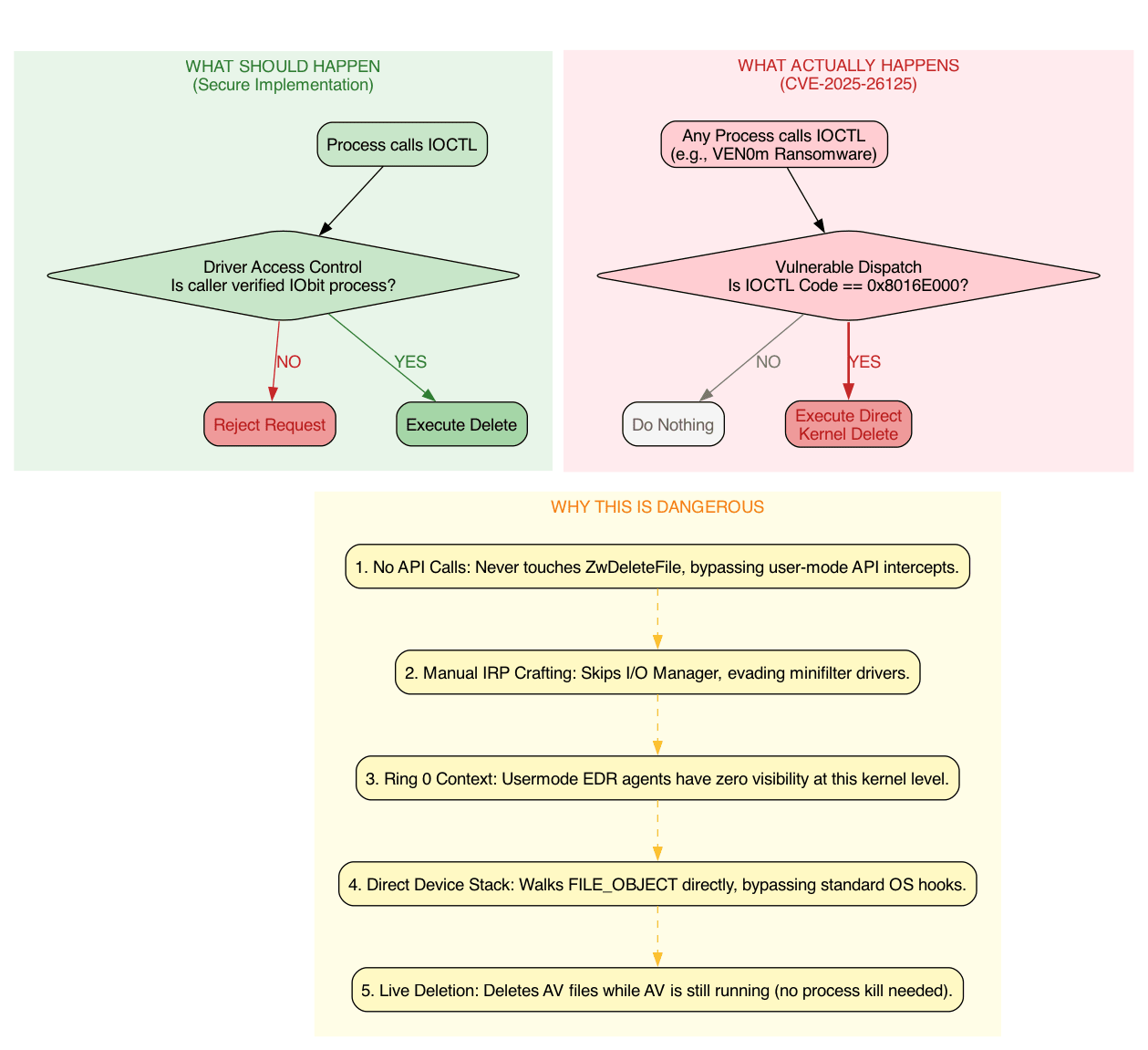
Figure 3: Secure vs vulnerable IOCTL dispatch behavior and why CVE-2025-26125 enables direct kernel-mode file deletion.
3.5 IOCTL Dispatch (0x11380) — The Kill Chain
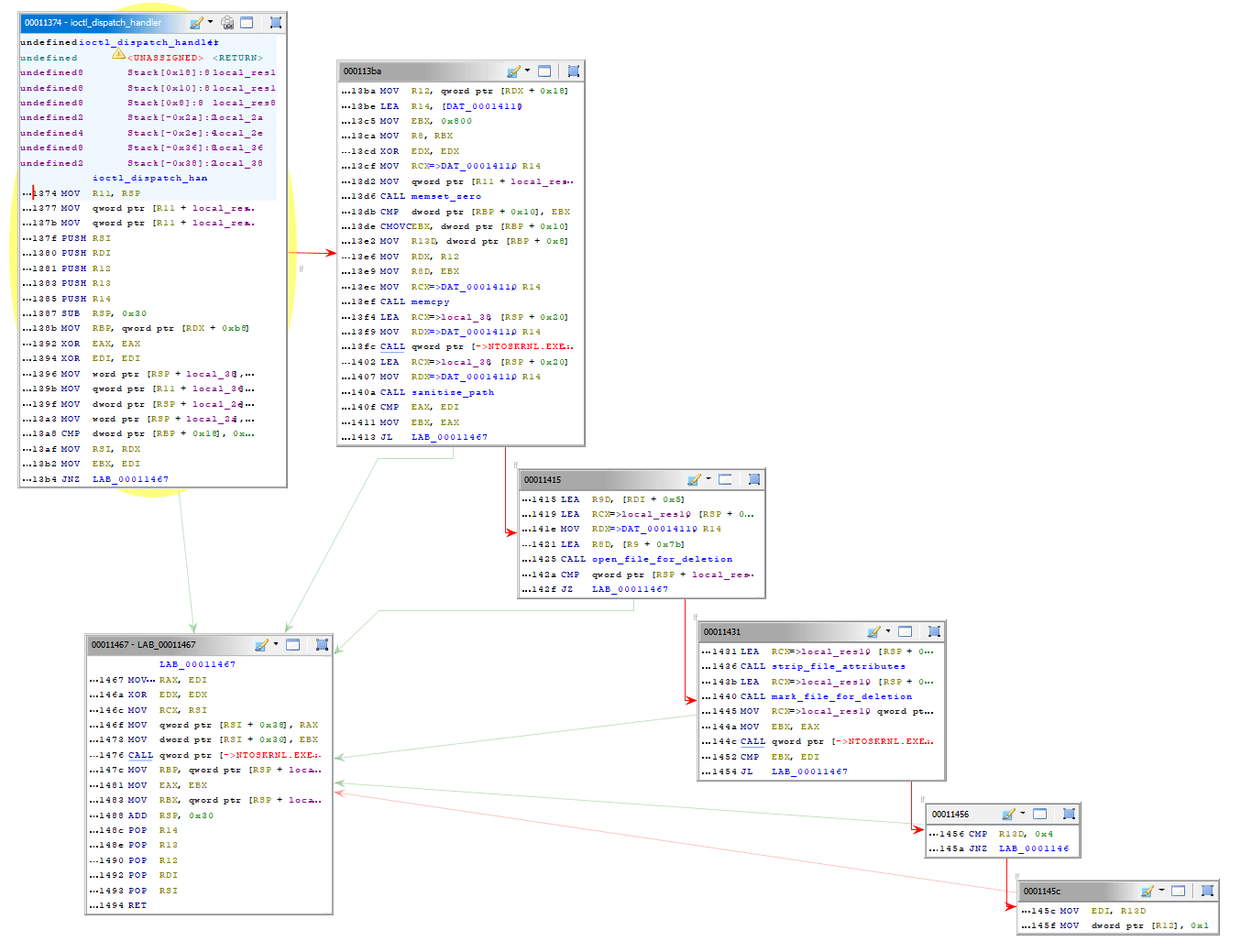
Figure 4: IOCTL dispatch handler overview at 0x11380 (driver-side entry point for usermode requests).
The dispatch function at 0x11380:
- LAB_00011390 — Entry: Receives IOCTL code and input buffer
- LAB_000113a4 — Verify input buffer size (must be >= 0x108 bytes); bail if not
- LAB_000113c6 — Branch on IOCTL code: if 0x8016E000, jump to the delete handler (
LAB_00011467) - LAB_000113d8 — Default path: if IOCTL doesn't match, return error (STATUS_INVALID_PARAMETER)
6. LAB_00011467 — Cleanup & Return
- Restores registers, tears down stack frame, returns
Overall this is a kernel driver that:
- Receives a file path via IOCTL from userspace
- Sanitizes the path
Strips file attributes and marks files for deletion at the kernel level — bypassing normal userspace protections
3.6 mark_file_for_deletion: How it works
Step 1 — Get the File Object (ObReferenceObjectByHandle) It takes the file handle passed in, and calls ObReferenceObjectByHandle with IoFileObjectType to get a pointer to the actual kernel FILE_OBJECT. If this fails (negative NTSTATUS), it jumps straight to cleanup at LAB_00011974.
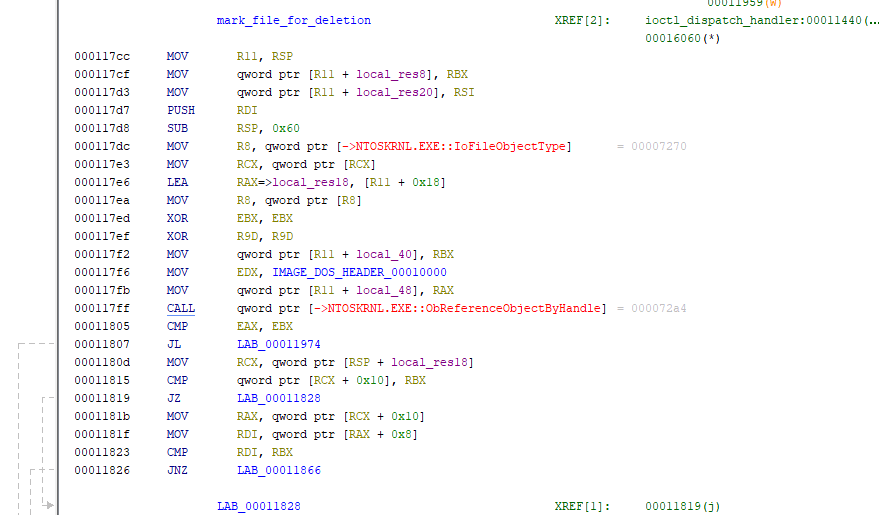
Figure 5: Step 1 of mark-for-deletion routine: ObReferenceObjectByHandle to obtain FILE_OBJECT.
Step 2 — Strip File Attributes
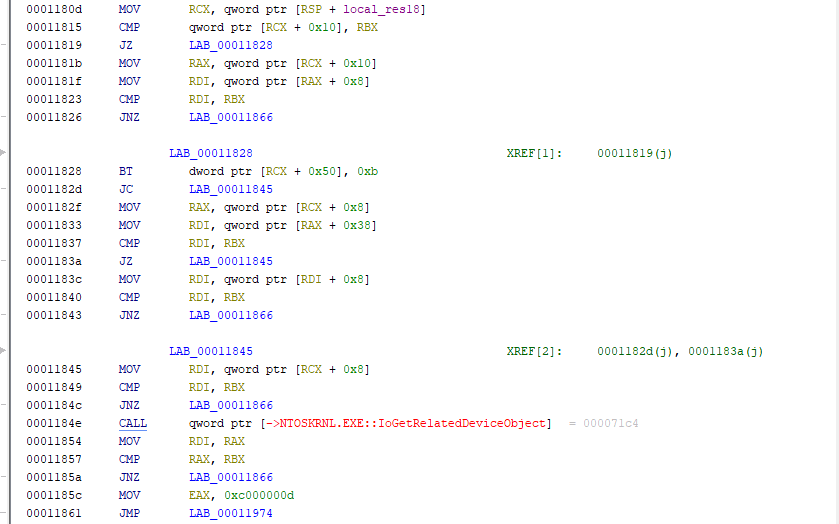
Figure 6: Step 2 of mark-for-deletion: stripping file attributes (FCB hardening).
Now the FILE_OBJECT is obtained. The driver:
- Dereferences the FILE_OBJECT to access the File Control Block (FCB) —
mov rax, [rax + 0x30](FILE_OBJECT->FsContext). - Clears file attributes that might prevent deletion:
- Sets
FCB->Flags |= FILE_FLAG_DELETE_ON_CLOSE(0x4000) - Sets
FCB->DeleteAccess = TRUE
- Sets
- This removes protections like FILE_ATTRIBUTE_READONLY and allows the kernel I/O manager to mark the file for deletion without user-mode interference.
Step 3 — Send FileDispositionInformation IRP
- Constructs an IRP (I/O Request Packet) with the
FileDispositionInformationclass (notFileDispositionInformationEx— important distinction) - Sets
IRP->UserBuffer->DeleteFile = TRUE - Sets
FUN_000115b4as the completion routine — called when the IRP finishes IofCallDriver— sends the IRP down to the device driver
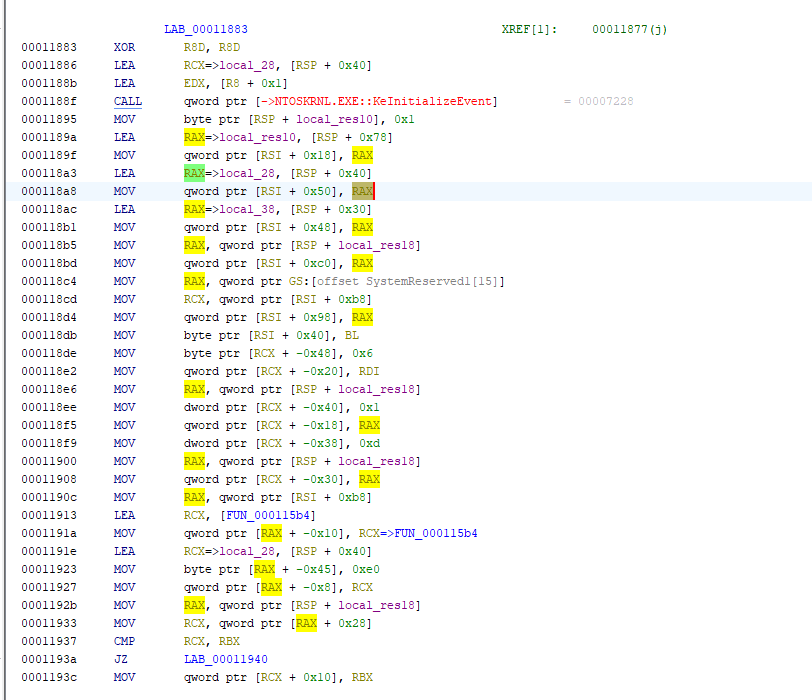
Figure 7: Step 3: manual IRP construction and dispatch for FileDispositionInformation.
Step 4 — Wait and Clean Up
At this point the IRP is queued. The driver waits via KeWaitForSingleObject for the completion routine to signal the kernel event. Once the file deletion is done, it cleans up the references, returns STATUS_SUCCESS, and the handler ends.
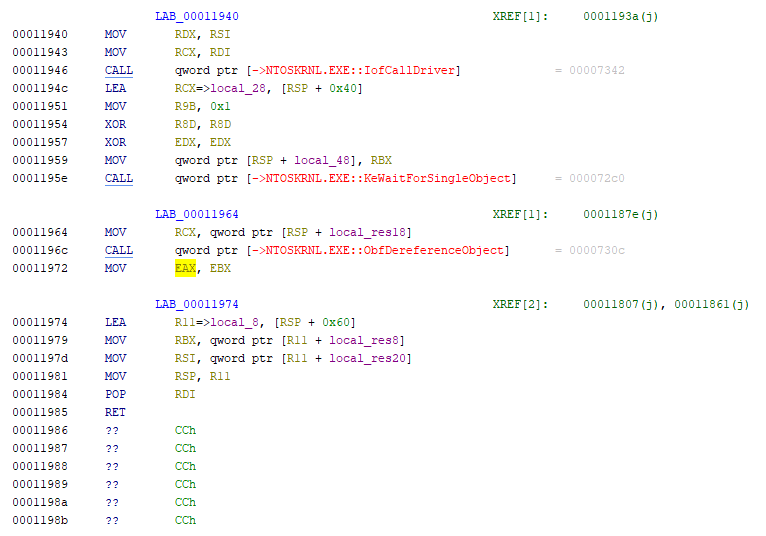
Figure 8: Step 4: synchronization, cleanup, and returning the NTSTATUS result.
Why This Works (Why It Defeats Protections)
Most user-mode file deletion goes through DeleteFileW() → NtDeleteFile() → kernel delete_file() syscall. At every step, security products can hook and inspect:
- The file path being deleted
- The calling process image name
- The calling process's credentials
- Whether the file is locked
- Whether the file is protected
But this driver-based deletion is different:
- It operates entirely in kernel mode — no userspace API call
- It uses the FileDispositionInformation class — a more intimate file system operation
- It strips attributes before marking for deletion — removes read-only flags and other protections
- It constructs an IRP directly — bypasses normal user-mode validation
- It uses a completion routine in ring-0 — the operation completes silently in the kernel without returning through user-mode APIs that security products monitor
Example: A security product might hook NtDeleteFile at the syscall layer. But this driver:
- Never calls
NtDeleteFile— it builds an IRP manually - Never triggers the delete syscall dispatch
- Deletes at the file system driver level — it sends the IRP directly to the NTFS driver
3.7 Why this kernel-based deletion technique is novel
Most ransomware deletes shadow copies and protected files by spawning cmd.exe and calling vssadmin delete shadows or wmic shadowcopy delete — these are usermode calls that every modern AV/EDR monitors heavily and will flag immediately.
The combination of all four together is what makes it notable — individually these tricks exist, but packaging them into a dedicated kernel driver component that receives targeted file paths via a private IOCTL interface shows a level of engineering sophistication beyond typical ransomware.
3.8 VEN0m's EDR Targeting Gap
VEN0m's target lists Windows Defender (the basic antimalware component at C:\Program Files\Windows Defender\), not Windows Defender for Endpoint, which are entirely separate products. VEN0m only targets the former.
In short: VEN0m's kernel driver is sophisticated enough to evade basic AV but wasn't engineered with enterprise MDE EDR - a significant operational blind spot that would get it caught in a lot of corporate environments.
4. Attack Chain: 9-Phase Technical Analysis
This section dissects each phase of VEN0m's attack chain at the source code level, including the exact Rust functions, Windows API calls, artifacts created, and detection opportunities.
4.1 Phase 1: UAC Bypass (T1548.002)
Technique: slui.exe DelegateExecute registry hijack
Source: src/uac.rs — bypass(), create_key(), run_as_admin(), is_elevated()
MITRE: T1548.002 (Abuse Elevation Control Mechanism: Bypass User Account Control)
Mechanism:
bypass()callsis_elevated()which checks the current process token via OpenProcessToken → GetTokenInformation(TokenElevation)- If not elevated, creates a registry key at HKCU\Software\Classes\Launcher.SystemSettings\Shell\Open\Command
- Sets
DelegateExecutevalue to an empty string (disables the delegate, forcing direct execution) - Sets the default value to the current executable path (
std::env::current_exe()) - Triggers ShellExecuteW with the
"runas"verb on C:\Windows\System32\slui.exe slui.exeauto-elevates (it's a trusted Microsoft binary), reads the hijacked registry key, and launches VEN0m with High integrity- The original non-elevated process calls
process::exit(0)— the elevated instance continues
Artifacts:
- Registry: HKCU\Software\Classes\Launcher.SystemSettings\Shell\Open\Command with
DelegateExecute=""and default value = VEN0m path
Detection Opportunity: Any write to the Launcher.SystemSettings\Shell\Open\Command registry path is anomalous. This key is not used by legitimate software. See Query 3.1.
4.2 Phase 2: BYOVD Driver Drop (T1211, T1569.002)
Technique: Bring Your Own Vulnerable Driver — IObit ForceDelete.sys (CVE-2025-26125)
Source: src/driver.rs — load(), init(); src/service.rs — register_kernel_service()
MITRE: T1211 (Exploitation for Defense Evasion), T1569.002 (Service Execution), T1543.003 (Create or Modify System Process), T1036.005 (Masquerading)
Mechanism:
- Driver bytes are embedded at compile time:
const DRIVER_BYTES: &[u8] = include_bytes!(r"../IMFForceDelete.sys")(src/main.rs:14) driver::load()writes the bytes to %TEMP%\MicrosoftUpdate11.01.sys (20,856 bytes)service::register_kernel_service()creates a kernel service via Windows Service Control Manager:- Name:
MicrosoftUpdate11.01 - Type:
KERNEL_DRIVER(Type 1) - Start:
AutoStart - Error Control:
Normal
- Name:
- Service is started, loading the driver into the kernel
driver::init()opens a handle to the device:\\.\IMFForceDelete123via CreateFileW
Artifacts:
- File: %TEMP%\MicrosoftUpdate11.01.sys (20,856 bytes, SHA256:
ef4e4b88...) - Registry: HKLM\SYSTEM\ControlSet001\Services\MicrosoftUpdate11.01
- Service:
MicrosoftUpdate11.01(kernel driver, AutoStart)
This is where the commercial EDR intervened — the driver was quarantined ~127ms after being written to disk, before the service could start it. The entire downstream attack chain depends on this driver loading successfully.
Detection Opportunity: Kernel drivers written to %TEMP%, %APPDATA%, or other user-writable paths are highly anomalous. Legitimate kernel drivers are installed to System32\drivers via Windows Update or MSI. See Queries 1.1–1.6.
4.3 Phase 3: AV/EDR Shredding (T1562.001)
Technique: Force-delete AV/EDR installation files via BYOVD kernel IOCTL
Source: src/driver.rs — ForceDelete(); src/main.rs:55-60; src/core.rs — gen_list(), extention_filter()
MITRE: T1562.001 (Impair Defenses: Disable or Modify Tools)
Mechanism:
- Iterates through the
TARGETSarray defined inmain.rs:C:\Program Files (x86)\Kaspersky LabC:\Program Files\BitdefenderC:\Program Files\Bitdefender AgentC:\Program Files\Windows Defender
- For each target folder,
core::gen_list()runscmd /c dir /s /b <target>to enumerate all files core::extention_filter()filters for.dll,.exe,.sysextensions- For each matching file,
driver::ForceDelete()calls DeviceIoControl with:- Device handle:
\\.\IMFForceDelete123 - IOCTL code:
0x8016E000 - Input buffer: file path with
\??\NT path prefix
- Device handle:
- The kernel driver force-deletes the file at the kernel level, bypassing all usermode protections
Why this works: The deletion targets files on disk, not processes in memory. Most AV self-protection mechanisms guard against process termination (via Protected Process Light or kernel callbacks), not file deletion via a kernel driver's IOCTL. The AV processes continue running temporarily but lose their backing executables and DLLs, becoming corrupted and non-functional.
Detection Opportunity: Mass deletion of executables in AV/EDR installation directories is an unambiguous indicator of compromise. No legitimate process performs this action.
4.4 Phase 4: Persistence (T1547.004)
Technique: Winlogon Userinit registry hijack + self-copy to %LOCALAPPDATA%
Source: src/persist.rs — persist()
MITRE: T1547.004 (Boot or Logon Autostart Execution: Winlogon Helper DLL)
Mechanism:
- Gets the current executable path via
std::env::current_exe() - Copies the entire binary to %LOCALAPPDATA%\MicrosoftUpdate11.03.exe via
std::fs::copy()— this creates a byte-for-byte clone (15.1 MB) - Opens HKLM\SOFTWARE\Microsoft\Windows NT\CurrentVersion\Winlogon
- Reads the current
Userinitvalue (default:C:\Windows\system32\userinit.exe,) - Appends the persistence path:
C:\Windows\system32\userinit.exe,C:\Users\...\AppData\Local\MicrosoftUpdate11.03.exe - The entire
persist()function is wrapped in a silent error handler — if persistence fails, execution continues to the encryption phase
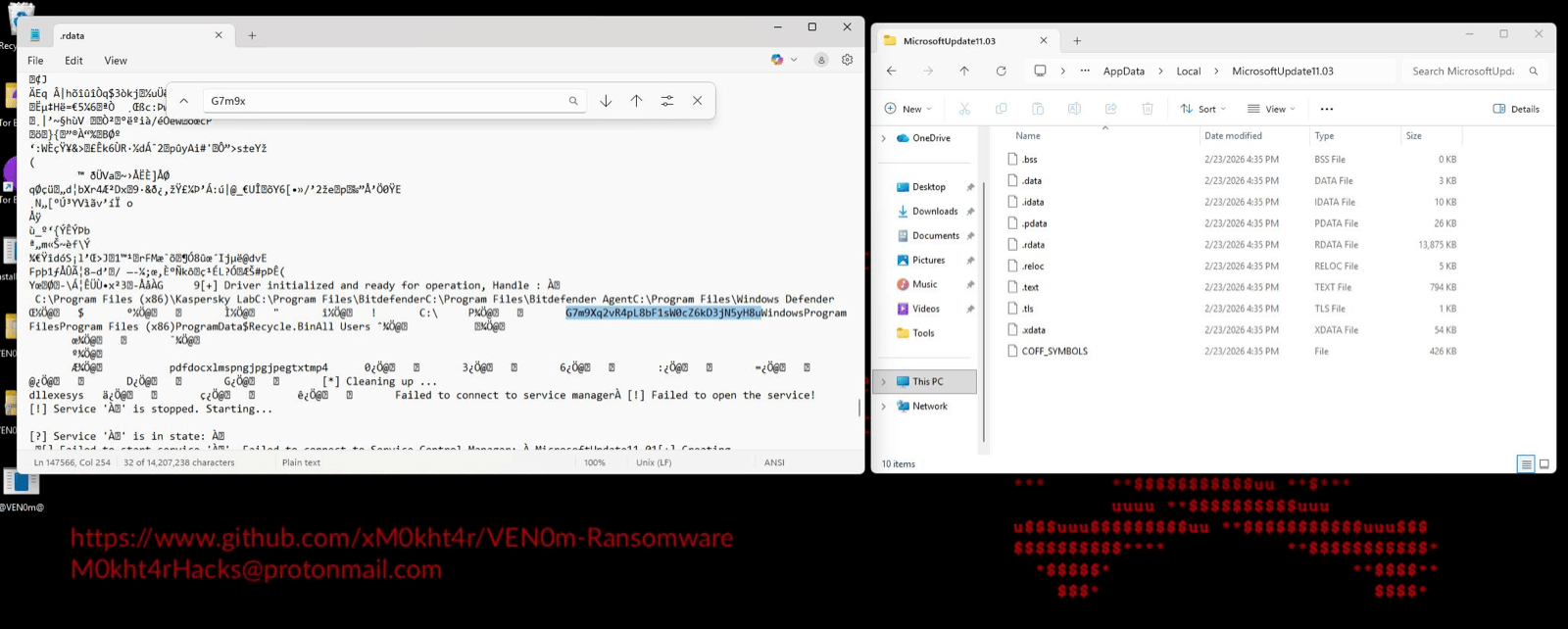
Figure 9: Persistence binary MicrosoftUpdate11.03 (15,193 KB) dropped to %LOCALAPPDATA% among legitimate Windows directories. The 15 MB file size and loose executable placement in the AppData\Local root are anomalous — legitimate applications create subdirectories, they don't drop standalone executables here.
Artifacts:
- File: %LOCALAPPDATA%\MicrosoftUpdate11.03.exe (byte-for-byte clone, 15.1 MB)
- Registry: HKLM\SOFTWARE\Microsoft\Windows NT\CurrentVersion\Winlogon\Userinit modified
DFIR Significance: This persistence binary IS the primary key recovery artifact. Because it is a byte-for-byte clone of the original payload, it contains the identical .rdata section with the hardcoded encryption key. If this file is present on the compromised system, key recovery is trivial. See Section 7.
Detection Opportunity: Standalone executables dropped to %LOCALAPPDATA% root (not a subdirectory) are suspicious. Modifications to the Winlogon Userinit value should trigger high-priority alerts. See Queries 4.1–4.3.
4.5 Phase 5: File Enumeration (T1083)
Technique: Recursive directory listing via cmd.exe subprocess with streaming pipe
Source: src/vnm.rs — Ven0m(); src/core.rs — gen_list(), exclusion_filter(), extention_filter()
MITRE: T1083 (File and Directory Discovery)
Mechanism:
- For each drive in the
DRVarray (default:C:\), spawnscmd /c dir /s /b C:\as a child process withStdio::piped() - Reads stdout via
BufReaderline-by-line (streaming, not buffered to memory) - For each discovered file path:
core::extention_filter()checks against the whitelist:pdf, doc, xlms, png, jpg, jpeg, txt, mp4core::exclusion_filter()checks if the parent path contains any excluded directory:Windows, Program Files, Program Files (x86), ProgramData, $Recycle.Bin, All Users
- Files passing both filters are sent to the encryption routine
Notable design choice: The streaming approach via BufReader means VEN0m can handle arbitrarily large file systems without loading the entire directory tree into memory. Files are encrypted as they are discovered, creating a progressive encryption pattern rather than a bulk operation.
Process artifact: cmd.exe child process with command line cmd /c dir /s /b C:\
Detection Opportunity: A non-shell process spawning cmd.exe with dir /s /b arguments across entire drives is highly anomalous outside of backup or indexing software. See Queries 5.1–5.2.
4.6 Phase 6: Encryption (T1486)
Technique: AES-256-GCM file encryption with hardcoded key
Source: src/encrypt.rs — encrypt()
MITRE: T1486 (Data Encrypted for Impact)
Mechanism:
sleep(Duration::from_millis(50))— 50ms delay between each file encryption- Read entire file contents into memory via
fs::read(path) - Initialize AES-256-GCM cipher with the hardcoded 32-byte key:
G7m9Xq2vR4pL8bF1sW0cZ6kD3jN5yH8u - Generate a cryptographically random 12-byte nonce via
Aes256Gcm::generate_nonce(&mut OsRng) - Encrypt:
cipher.encrypt(&nonce, content.as_ref()) - Concatenate: nonce bytes + encrypted content (which includes the 16-byte GCM authentication tag)
- Truncate the original file and write the encrypted content in-place
- Rename: append
.vnmextension to the original filename
Encrypted File Format:
+----------+------------------------------------------+
|  Nonce   |        Ciphertext + GCM Auth Tag          |
|  12 B    |     (original_size + 16 bytes)            |
+----------+------------------------------------------+- First 12 bytes: random nonce (unique per file)
- Remaining bytes: AES-256-GCM ciphertext with appended 16-byte authentication tag
- Total file overhead: +28 bytes per file (12 nonce + 16 tag)
Cryptographic note: AES-256-GCM provides both confidentiality and integrity. The 16-byte GCM authentication tag means that decryption with the wrong key will fail immediately (tag mismatch), while successful decryption guarantees the data is intact. There is no key derivation function, no salt, no key stretching — the hardcoded key is used directly as the AES-256 key material. This is VEN0m's critical design flaw: one key encrypts all files on all victims.
The 50ms delay: The sleep(Duration::from_millis(50)) between each file encryption is likely intended to avoid triggering behavioral thresholds based on rapid file modification rates. This throttles the encryption to approximately 20 files per second maximum.
Detection Opportunity: High entropy file writes and rapid file renaming with new extensions are strong ransomware indicators. See Queries 6.1–6.5.
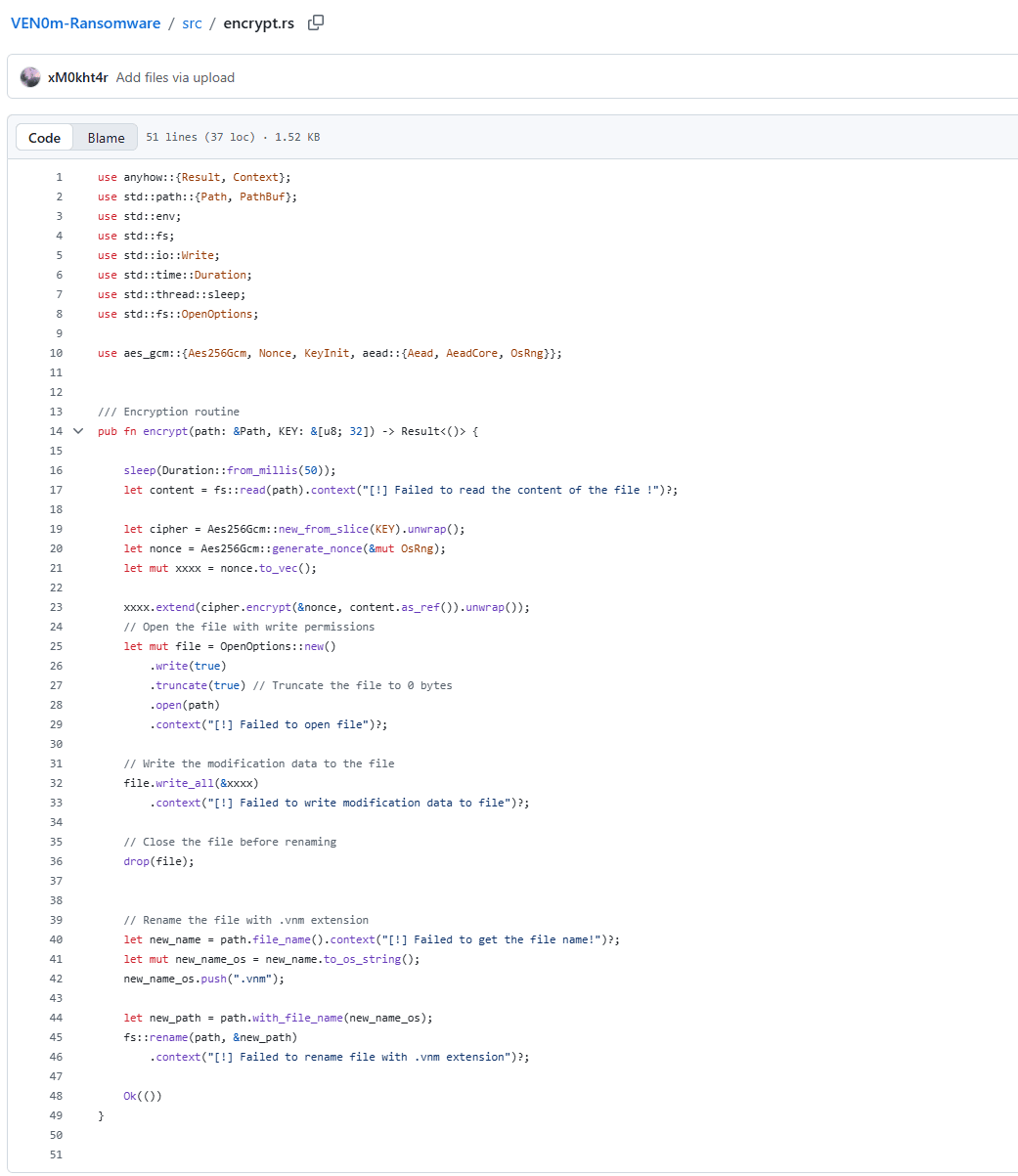
Figure 10: encrypt.rs file from github.com/xM0kht4r/VEN0m-Ransomware.
The double-buffer problem
Both issues trace back to two consecutive lines. Line 17:
let content = fs::read(path).context("[!] Failed to read the content of the file !")?;
fs::read() loads the entire file into a Vec<u8> on the heap. Then line 23:
xxxx.extend(cipher.encrypt(&nonce, content.as_ref()).unwrap());
cipher.encrypt() allocates a second full-size buffer for the ciphertext and appends it into xxxx. Both buffers live simultaneously — content is never dropped before xxxx is written — so at peak the process holds roughly 2× the file size in RAM. A 100GB database file requires ~200GB of addressable heap. When the allocator cannot satisfy that request, it calls handle_alloc_error, which invokes the registered allocation failure hook and aborts the process directly — bypassing any panic handler or unwinding entirely. There is no opportunity to catch it, log it, or recover. The process just dies, and that file never gets encrypted.
The naked unwrap() making it worse
The .unwrap() on line 23 means there is zero error handling on the encrypt call itself. AES-GCM has a hard cryptographic ceiling of 2³² blocks per nonce — roughly 64GB of plaintext per encryption operation. Feed it anything larger and the aes-gcm crate will return an error. Because that error hits .unwrap() instead of being handled, the result is an immediate panic that unwinds the entire thread. This is worse than the OOM case — at least handle_alloc_error is a known abort path. Here, one oversized file crashes the whole process, halting encryption of every remaining file in the queue. The victim's other files are left untouched not because of any defensive measure, but because of a bug.
4.7 Phase 7: Scheduled Task (T1053.005)
Technique: Scheduled task for ransom note persistence with masquerading name
Source: src/task.rs — register()
MITRE: T1053.005 (Scheduled Task/Job: Scheduled Task), T1036.005 (Masquerading)
Mechanism:
- Extracts the embedded ransom note binary:
include_bytes!("../target/release/note.exe") - Writes it to %USERPROFILE%\Desktop\@[email protected]
- Creates a scheduled task via
schtasks.exe:
schtasks /Create /SC MINUTE /MO 2 /TN MicrosoftUpdate11.01 /TR <path>\@[email protected] /RL HIGHEST /F/SC MINUTE /MO 2— fires every 2 minutes/TN MicrosoftUpdate11.01— task name masquerades as Microsoft update/RL HIGHEST— runs with highest available privilege/F— force overwrite if task exists
- Immediately runs the task:
schtasks /Run /TN MicrosoftUpdate11.01
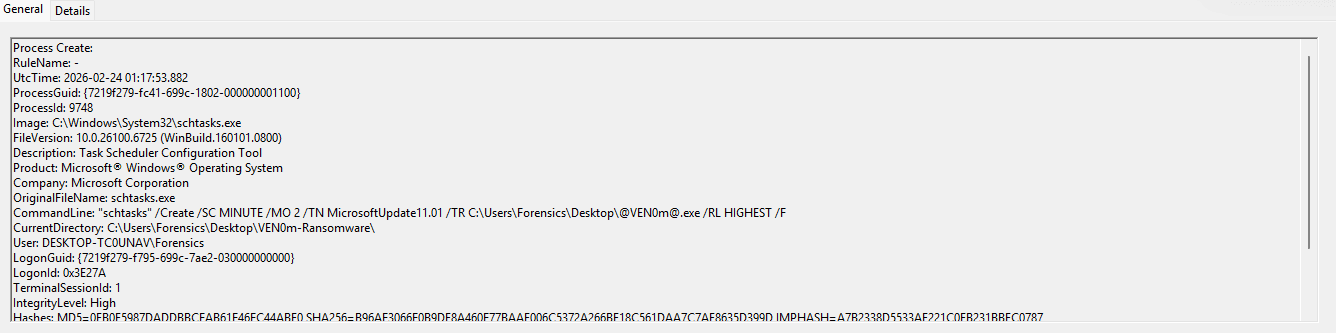
Figure 11: Sysmon Process Create event capturing the scheduled task creation. The full command line reveals the 2-minute execution interval (/SC MINUTE /MO 2), highest run level (/RL HIGHEST), the @[email protected] Desktop path, and the masquerading task name MicrosoftUpdate11.01. IntegrityLevel: High confirms the UAC bypass from Phase 1 was successful.
Artifacts:
- File: %USERPROFILE%\Desktop\@[email protected] (ransom note GUI binary)
- Scheduled task:
MicrosoftUpdate11.01(every 2 minutes, HIGHEST privilege)
Detection Opportunity: Scheduled tasks with names mimicking Microsoft products, running executables from the Desktop at HIGHEST privilege every few minutes, are unambiguously malicious. The @ characters in the filename add another anomalous signal. See Queries 7.1–7.4.
4.8 Phase 8: Ransom Note Display (T1491.001, T1056)
Technique: Fullscreen GUI ransom note with input blocking
Source: src/ransom_note.rs (compiled as separate note.exe binary)
MITRE: T1491.001 (Defacement: Internal Defacement), T1056 (Input Capture — used here for input blocking)
Mechanism:
unsafe { BlockInput(1) }— locks keyboard and mouse input system-wide- Launches a fullscreen, undecorated
eframe/eguiwindow titled "VEN0m" - Displays ASCII skull art built from
$anducharacters AppStateflashes between two color schemes every 500ms:- Black background / red text
- Red background / black text
should_close()checks if 30 seconds have elapsed since launch- After 30 seconds, the window closes and
BlockInput(0)restores input core::freeze()function exists to killexplorer.exeviaCreateToolhelp32Snapshotenumeration andTerminateProcess, but is commented out in the released version (//core::freeze();)
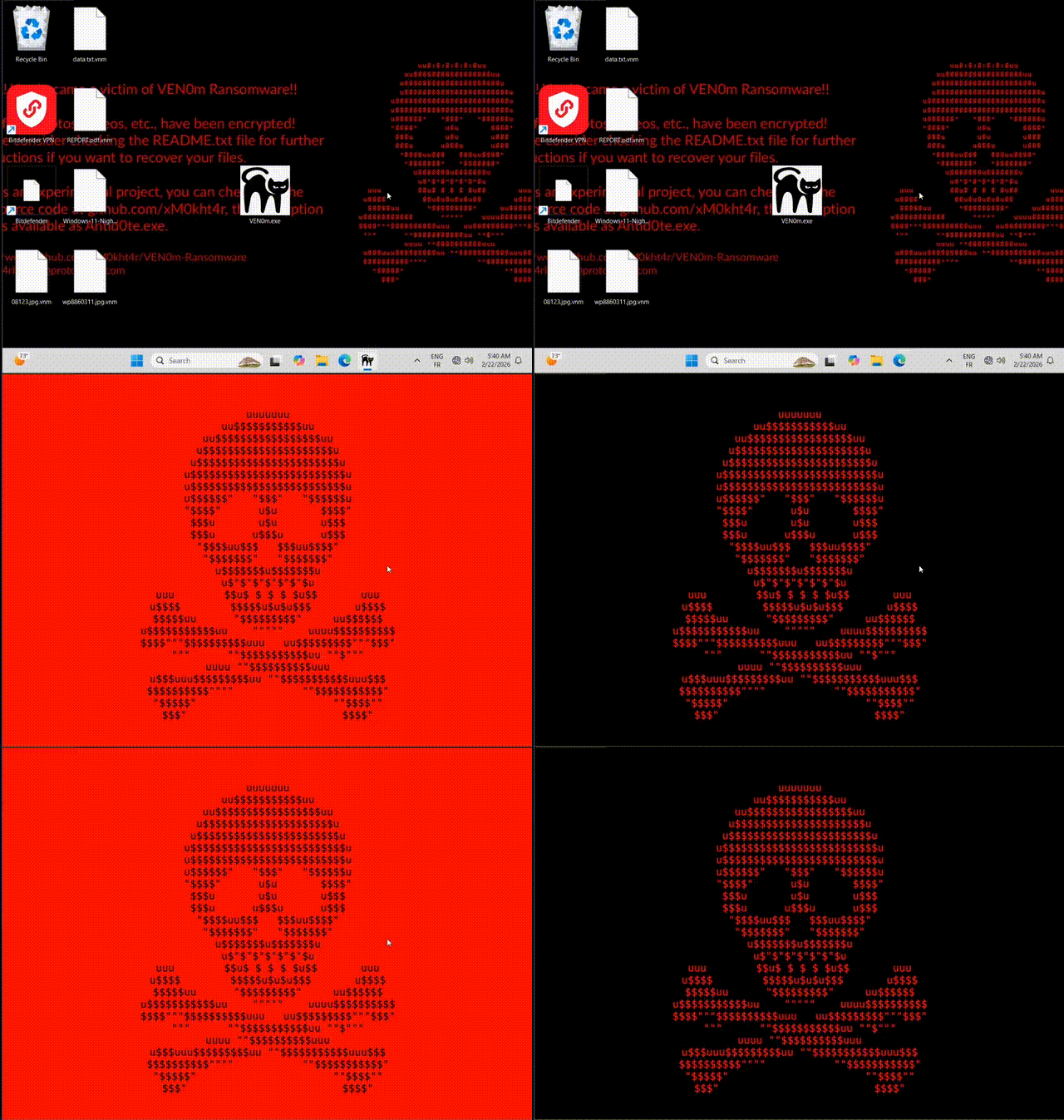
Figure 12: VEN0m ransom note GUI captured during the red-phase flash cycle. The fullscreen display blocks all user interaction for 30 seconds via BlockInput(). The ASCII skull art is rendered in monospace text using $ and u characters. This binary (@[email protected]) does NOT contain the encryption key — it is the separate note.exe GUI-only binary.
Important for responders: The @[email protected] / note.exe binary is a dead end for key recovery. It contains only the ransom note GUI code, not the encryption routines or the encryption key.
4.9 Phase 9: Wallpaper Change (T1491.001)
Technique: Desktop wallpaper replacement via Windows API
Source: src/wallpaper.rs — set_wallpaper(), load()
MITRE: T1491.001 (Defacement: Internal Defacement)
Mechanism:
- Wallpaper image is embedded at compile time:
const WALL: &[u8] = include_bytes!(r"../assets/wallpaper.jpg") load()writes the image to %TEMP%\MicrosoftUpdate11.03.jpgset_wallpaper()callsSystemParametersInfoWwithSPI_SETDESKWALLPAPERandSPIF_UPDATEINIFILE | SPIF_SENDCHANGE
Artifacts:
- File: %TEMP%\MicrosoftUpdate11.03.jpg
- Registry: Wallpaper path updated in user profile
Detection Opportunity: Image files with system-sounding names written to %TEMP% are suspicious, particularly when followed by a SystemParametersInfoW call. See Query 8.1.
5. MITRE ATT&CK Mapping
| Technique | ID | Phase | Source File | Detection Query |
|---|---|---|---|---|
| Abuse Elevation Control Mechanism: Bypass UAC | T1548.002 | 1 | src/uac.rs | 3.1–3.3 |
| Exploitation for Defense Evasion | T1211 | 2 | src/driver.rs | 1.1–1.6 |
| Impair Defenses: Disable or Modify Tools | T1562.001 | 3 | src/driver.rs, src/main.rs | 2.1–2.3 |
| Boot or Logon Autostart: Winlogon Helper | T1547.004 | 4 | src/persist.rs | 4.1–4.3 |
| Data Encrypted for Impact | T1486 | 6 | src/encrypt.rs | 6.1–6.5 |
| System Services: Service Execution | T1569.002 | 2 | src/service.rs | 1.3–1.4 |
| Scheduled Task/Job: Scheduled Task | T1053.005 | 7 | src/task.rs | 7.1–7.4 |
| Modify Registry | T1112 | 1, 4 | src/uac.rs, src/persist.rs | 3.1, 4.1 |
| Defacement: Internal Defacement | T1491.001 | 8, 9 | src/ransom_note.rs, src/wallpaper.rs | 8.1 |
| Input Capture/Block | T1056 | 8 | src/ransom_note.rs | — |
| Masquerading: Match Legitimate Name | T1036.005 | 2, 7 | src/service.rs, src/task.rs | 1.4, 7.1 |
| Create or Modify System Process: Windows Service | T1543.003 | 2 | src/service.rs | 1.3 |
| File and Directory Discovery | T1083 | 5 | src/core.rs, src/vnm.rs | 5.1–5.2 |
| Process Discovery | T1057 | 8 | src/core.rs (freeze()) | 9.1 |
| Ingress Tool Transfer | T1105 | 2 | src/main.rs (include_bytes!) | — |
6. Indicators of Compromise
6.1 File Hashes
VEN0m.exe (Main Payload)
| Hash Type | Value |
|---|---|
| SHA256 | fb32df049926bbe9f9ac4f8da37282f4187837bef9065a3f560e743e8455ab10 |
| MD5 | 6627a5febb0f0f9327a7f1db7a68156e |
| Size | 15,557,100 bytes (15.1 MB) |
MicrosoftUpdate11.01.sys (BYOVD Driver — IObit ForceDelete.sys)
| Hash Type | Value |
|---|---|
| SHA256 | ef4e4b88df24825dbf4e7131e71a41002715d38b7a8c0c432aa936c854152ef3 |
| Authenticode SHA256 | f003c8abf8a692de770eb3bb8babec8c72f836d856f9c96f4de30e3ab47fea0f |
| Size | 20,856 bytes |
note.exe (Ransom Note GUI)
| Hash Type | Value |
|---|---|
| SHA256 | 7ff79a1e46806cb6167c4a3693d3632b984688fc78dd5ee99942f32c6b8bfff9 |
| MD5 | 535801ba3bf920ef33f03d674cc933a2 |
Antid0te.exe (Decryptor)
| Hash Type | Value |
|---|---|
| SHA256 | e7035bfdfc59c080268b930f5f8d38e6d99e77c9613d0d4cd822fb9fa6d16a97 |
6.2 File System Artifacts
Files Dropped/Written
| Path | Description |
|---|---|
%TEMP%\MicrosoftUpdate11.01.sys | Vulnerable driver (IObit ForceDelete.sys renamed) |
%LOCALAPPDATA%\MicrosoftUpdate11.03.exe | Persistence copy of payload (byte-for-byte clone) |
%TEMP%\MicrosoftUpdate11.03.jpg | Ransomware wallpaper image |
%USERPROFILE%\Desktop\@[email protected] | Ransom note GUI binary |
*.vnm | Encrypted file extension |
AV/EDR Target Directories (Force-Deleted via BYOVD)
| Path |
|---|
C:\Program Files (x86)\Kaspersky Lab |
C:\Program Files\Bitdefender |
C:\Program Files\Bitdefender Agent |
C:\Program Files\Windows Defender |
Excluded Directories (Not Encrypted)
| Directory |
|---|
Windows |
Program Files |
Program Files (x86) |
ProgramData |
$Recycle.Bin |
All Users |
Targeted File Extensions
The VEN0m ransomware targets these file extensions for encryption:
pdf, doc, xlms, png, jpg, jpeg, txt, mp4
6.3 Registry Indicators
UAC Bypass
| Registry Path | Value Name | Value Data |
|---|---|---|
| HKCU\Software\Classes\Launcher.SystemSettings\Shell\Open\Command | (Default) | Path to VEN0m.exe |
| HKCU\Software\Classes\Launcher.SystemSettings\Shell\Open\Command | DelegateExecute | "" (empty string) |
Persistence
| Registry Path | Value Name | Value Data |
|---|---|---|
| HKLM\SOFTWARE\Microsoft\Windows NT\CurrentVersion\Winlogon | Userinit | C:\Windows\system32\userinit.exe,<LOCALAPPDATA>\MicrosoftUpdate11.03.exe |
Service
| Registry Path | Value Name | Value Data |
|---|---|---|
| HKLM\SYSTEM\ControlSet001\Services\MicrosoftUpdate11.01 | ImagePath | \??\C:\Users\...\AppData\Local\Temp\MicrosoftUpdate11.01.sys |
| HKLM\SYSTEM\ControlSet001\Services\MicrosoftUpdate11.01 | DisplayName | MicrosoftUpdate11.01 |
6.4 Service Indicators
| Attribute | Value |
|---|---|
| Service Name | MicrosoftUpdate11.01 |
| Display Name | MicrosoftUpdate11.01 |
| Service Type | Kernel Driver (Type 1) |
| Start Type | AutoStart (Start 2) |
| Error Control | Normal (1) |
| Image Path | %TEMP%\MicrosoftUpdate11.01.sys |
6.5 Scheduled Task Indicators
| Attribute | Value |
|---|---|
| Task Name | MicrosoftUpdate11.01 |
| Schedule | Every 2 minutes (/SC MINUTE /MO 2) |
| Command | %USERPROFILE%\Desktop\@[email protected] |
| Run Level | HIGHEST |
| Full CLI | schtasks /Create /SC MINUTE /MO 2 /TN MicrosoftUpdate11.01 /TR ...@[email protected] /RL HIGHEST /F |
6.6 Process Indicators
Process Tree
explorer.exe
  +-- VEN0m.exe (PID 4656, IntegrityLevel: High)
  |     +-- conhost.exe (console host)
  |     +-- cmd.exe (dir /s /b file enumeration)
  |     +-- schtasks.exe (task creation)
  +-- note.exe (ransom note GUI, also spawned via scheduled task)
Command Lines
| Process | Command Line |
|---|---|
| VEN0m.exe | "C:\Users\...\VEN0m.exe" |
| conhost.exe | \??\C:\WINDOWS\system32\conhost.exe 0xffffffff -ForceV1 |
| cmd.exe | cmd /c dir /s /b C:\ |
| schtasks.exe (create) | schtasks /Create /SC MINUTE /MO 2 /TN MicrosoftUpdate11.01 /TR ...@[email protected] /RL HIGHEST /F |
| schtasks.exe (run) | schtasks /Run /TN MicrosoftUpdate11.01 |
| slui.exe | C:\Windows\System32\slui.exe (UAC bypass trigger) |
6.7 Network and Attribution
| Type | Value |
|---|---|
| GitHub URL | https://github.com/xM0kht4r/VEN0m-Ransomware |
| Author Email | [email protected] |
| Author Handle | xM0kht4r |
VEN0m has NO C2 infrastructure. All encryption is performed locally with a hardcoded key. The payload makes zero outbound network connections. There is no data exfiltration, no key exchange protocol, and no remote command channel.
6.8 Driver and IOCTL Indicators
| Attribute | Value |
|---|---|
| CVE | CVE-2025-26125 |
| Embedded Driver | IMFForceDelete.sys |
| Dropped As | MicrosoftUpdate11.01.sys |
| Original Filename (PE) | ForceDelete.sys |
| Company (PE) | IObit |
| File Version (PE) | 7.0.0.5 built by: WinDDK |
| Image Timestamp (PE) | 1659427021 (2022-08-02 UTC) |
| Device Name | \\.\IMFForceDelete123 |
| IOCTL Code | 0x8016E000 |
| NT Path Prefix | \??\ (prepended to deletion targets) |
| Subsystem | Native (Kernel driver) |
6.9 YARA-Relevant Strings
High-Value Detection Strings
| String | Context |
|---|---|
G7m9Xq2vR4pL8bF1sW0cZ6kD3jN5yH8u | Hardcoded AES-256 encryption key (32 bytes, plaintext in .rdata) |
@[email protected] | Ransom note filename |
MicrosoftUpdate11.01 | Service name, scheduled task name |
MicrosoftUpdate11.03 | Persistence binary / wallpaper naming |
IMFForceDelete123 | BYOVD driver device name |
\\.\IMFForceDelete123 | Full device path |
.vnm | Encrypted file extension |
Ven0m | Internal function name |
VEN0m | Product name, window title |
Antid0te | Decryptor binary name |
Operational Strings (Debug/Error Messages)
[+] Driver initialized and ready for operation, Handle :
[+] Executing UAC Bypass
[+] UAC Bypassed! Running with elevated privs!
[+] Creating 'MicrosoftUpdate11.01' service ...
[+] Note dropped to
[*] Cleaning up ...
[*] Driver Handle closed!
[!] `DeviceIoControl` failed! Error code:
-> Deleting File :
-> Encrypting:
-> Decrypting:
-> Program configured to run at user logon via Winlogon.
ASCII Skull Art Signature (in note.exe)
uuuuuuu
 uu$$$$$$$$$$$uu
u$$$$$$"   "$$$"   "$$$$$$u
The full skull art in src/ransom_note.rs serves as a unique fingerprint for this ransomware family.
6.10 Behavioral Indicators
| Behavior | Description |
|---|---|
Mass rename to .vnm | All encrypted files get .vnm appended |
BlockInput(1) | Keyboard/mouse locked during 30s ransom note display |
| AES-256-GCM file format | [12-byte nonce][ciphertext + 16-byte GCM tag] |
| 50ms inter-file delay | sleep(Duration::from_millis(50)) between each file encryption |
dir /s /b pipe streaming | File enumeration via cmd.exe subprocess with BufReader |
| Explorer.exe termination | TerminateProcess via CreateToolhelp32Snapshot (commented out in release) |
| Fullscreen flashing GUI | Red/black alternation every 500ms, undecorated window, 30s auto-close |
Self-copy to %LOCALAPPDATA% | Persistence binary is byte-for-byte clone of original payload |
| Wallpaper via SystemParametersInfoW | SPI_SETDESKWALLPAPER with SPIF_UPDATEINIFILE |
| Silently continues on error | Encryption and persistence failures caught, execution continues |
| Hardcoded key in .rdata | Plaintext ASCII key adjacent to AV target paths and exclusion lists |
7. Key Recovery and Decryption
This section describes how to recover the encryption key from a VEN0m-compromised system and decrypt all affected files. For incident responders, this transforms VEN0m from a data-loss event into a recoverable incident.
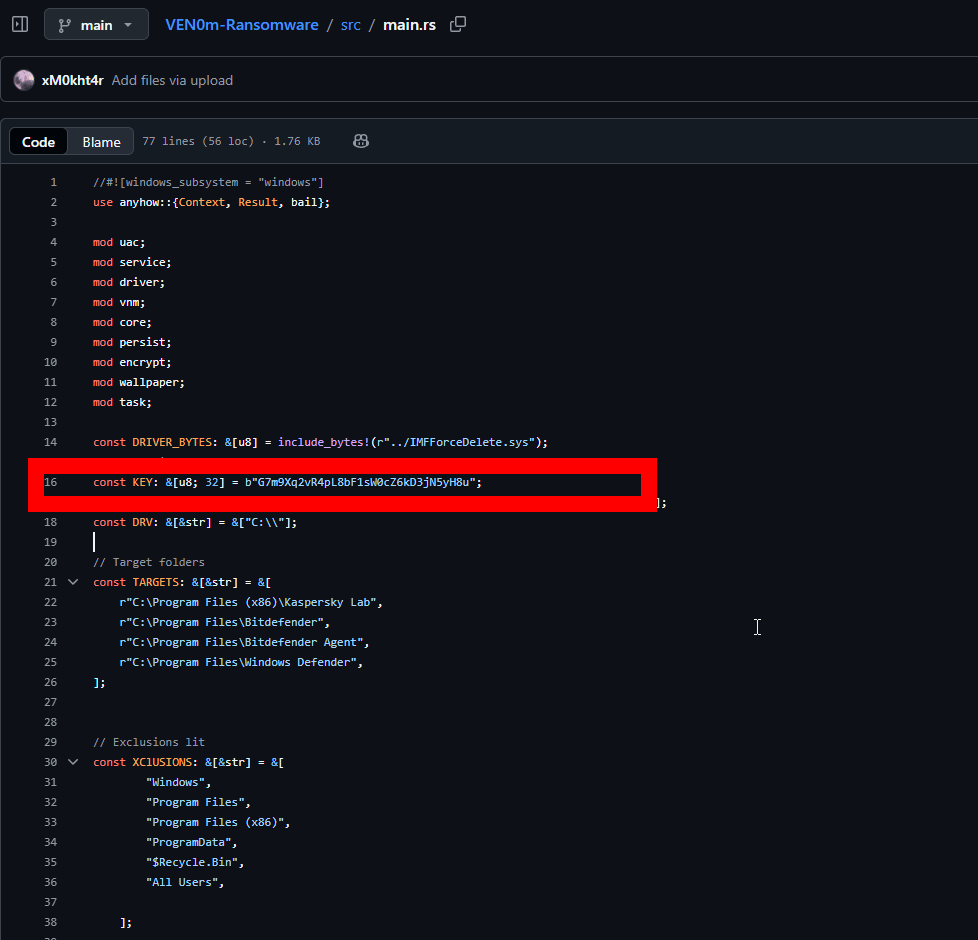
Figure 13: Key-recovery workflow overview (locating the persistence binary and extracting strings).
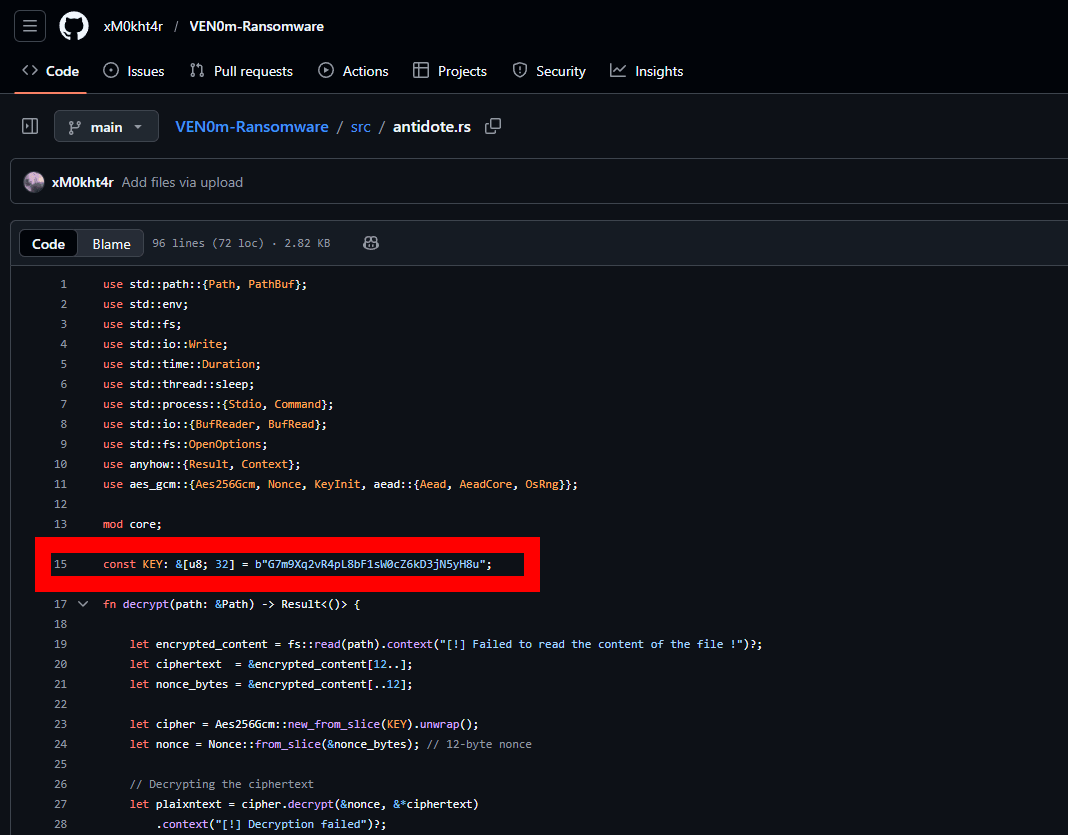
Figure 14: Supporting artifact view relevant to key recovery (binary/section context).
7.1 The Critical Vulnerability: Hardcoded Key in .rdata
VEN0m's fatal design flaw is its encryption key management. The AES-256 key G7m9Xq2vR4pL8bF1sW0cZ6kD3jN5yH8u is a 32-byte ASCII string stored as a compile-time constant in Rust source code:
// src/main.rs, line 16
const KEY: &[u8; 32] = b"G7m9Xq2vR4pL8bF1sW0cZ6kD3jN5yH8u";
When compiled, Rust const byte literals are placed directly in the PE .rdata (read-only data) section. There is:
- No obfuscation of the key
- No encryption of the key itself
- No key derivation function (no salt, no PBKDF2, no Argon2)
- No per-victim key generation — the same key encrypts all files on all victims
The key sits in a predictable location within .rdata, adjacent to other string constants:
- AV target paths (Kaspersky Lab, Bitdefender, Windows Defender)
- Encryption key:
G7m9Xq2vR4pL8bF1sW0cZ6kD3jN5yH8u - Exclusion directories (Windows, Program Files, ProgramData, $Recycle.Bin)
- Target file extensions (pdf, doc, xlms, png, jpg, jpeg, txt, mp4)
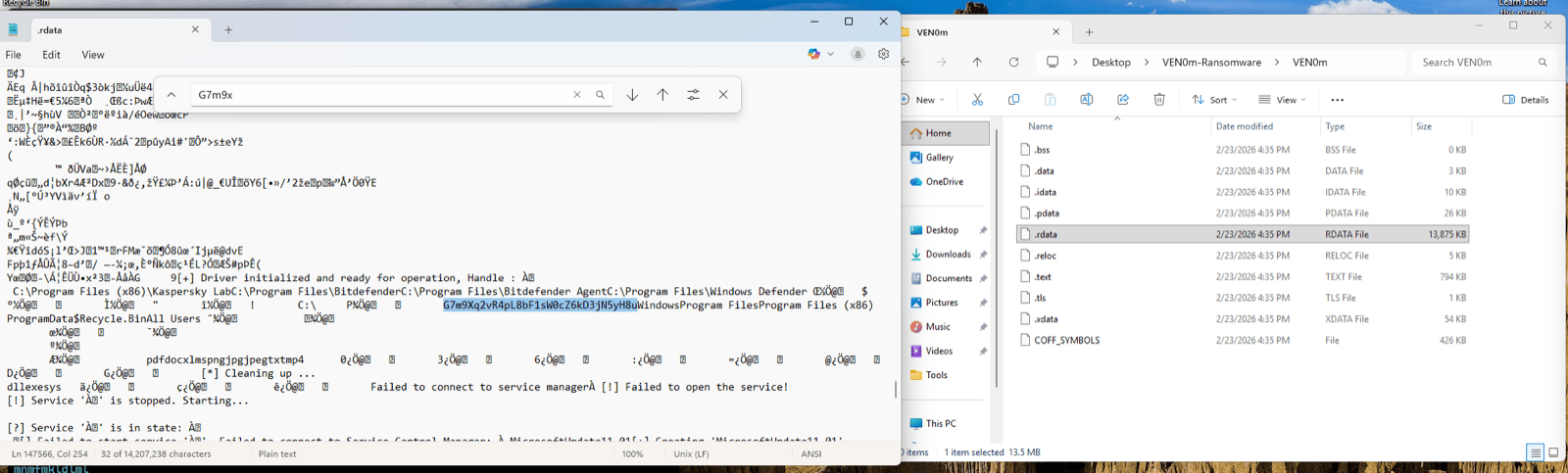
Figure 15: PE .rdata section viewed in a text editor with search term G7m9x. The encryption key (highlighted) sits between AV target paths and exclusion directory lists. The right pane shows the PE section layout — the .rdata section is 13,875 KB, containing all string constants from the compiled Rust binary. No obfuscation, no encoding — the key is plaintext ASCII.
7.2 Recovery Vector 1: Persistence Binary (Primary)
Target: %LOCALAPPDATA%\MicrosoftUpdate11.03.exe
Time to recover: Under 60 seconds
Tools needed: strings (or any hex editor / text search tool)
The persistence binary created in Phase 4 is a byte-for-byte clone of the original VEN0m payload. It contains the identical .rdata section with the hardcoded key. This is the fastest and most reliable recovery path.
Recovery procedure:
strings -n 10 "%LOCALAPPDATA%\MicrosoftUpdate11.03.exe" > output.txt
findstr "G7m9" output.txt
Or on Linux/macOS (analyzing a disk image):
strings -n 10 MicrosoftUpdate11.03.exe | grep "G7m9"The key will appear as: G7m9Xq2vR4pL8bF1sW0cZ6kD3jN5yH8u
If you don't know the key prefix, search for any 32-character high-entropy alphanumeric string near the IOC strings MicrosoftUpdate11.01, IMFForceDelete123, or Kaspersky Lab.
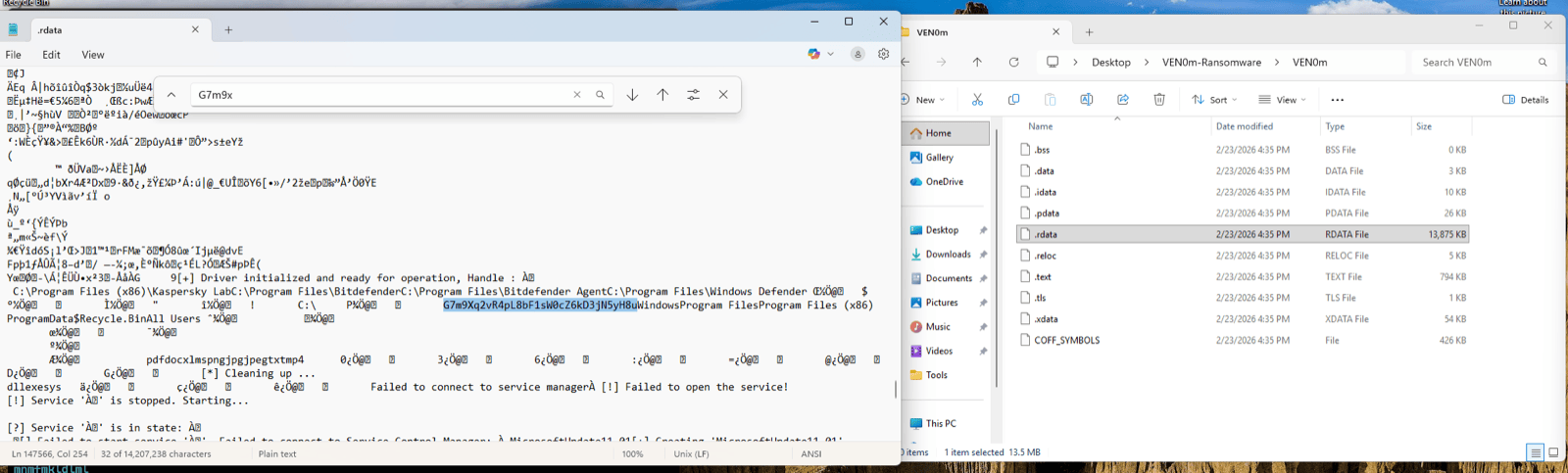
Figure 16: Side-by-side confirmation of key recovery. Left pane: strings output from MicrosoftUpdate11.03.exe showing the encryption key highlighted, with the GitHub attribution URL and author email visible below it. Right pane: Explorer confirming the persistence binary location in AppData\Local. A single strings command on this file yields both the decryption key AND threat actor attribution.
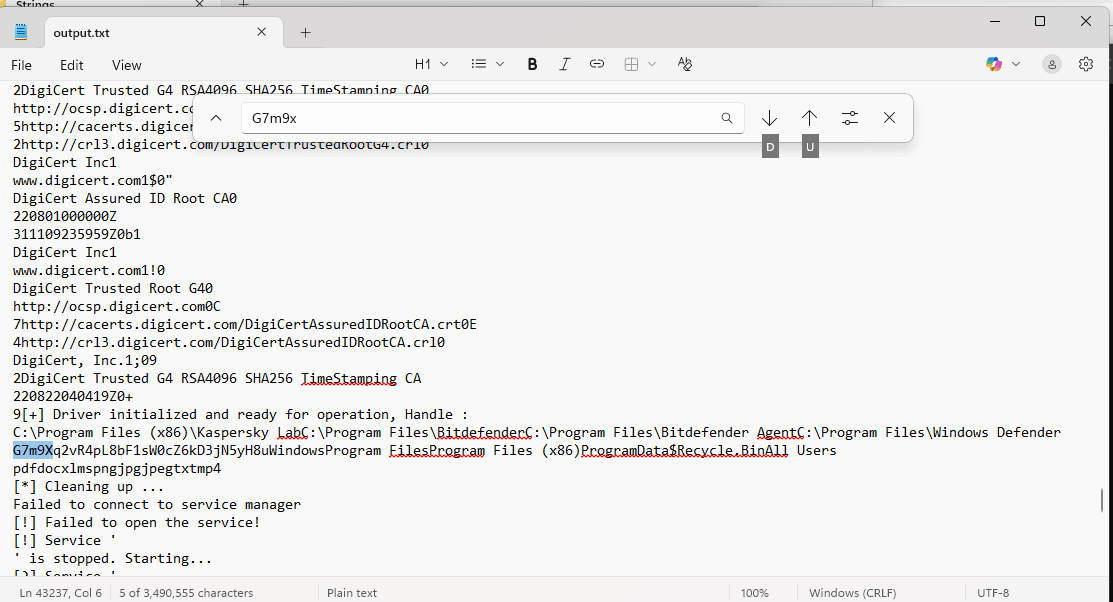
Figure 17: End-to-end validation of the strings recovery approach. Command: strings -n 10 MicrosoftUpdate11.03.exe > output.txt produced 3,490,555 characters. Searching for G7m9x located the key at approximately line 43,237. The surrounding context shows driver initialization strings, AV target paths, and operational messages — all confirming this is the correct .rdata region.
Bonus intelligence: The strings output also reveals:
- GitHub repository URL:
https://www.github.com/xM0kht4r/VEN0m-Ransomware - Author email:
[email protected] - Debug/operational messages that confirm the binary's purpose
7.3 Recovery Vector 2: NTFS Forensics
When to use: The persistence binary at %LOCALAPPDATA%\MicrosoftUpdate11.03.exe has been deleted or the disk has been partially wiped.
Strategy:
- $MFT Analysis: Parse the Master File Table for deleted entries matching known file characteristics:
- Filename:
MicrosoftUpdate11.03.exe - Size: approximately 15,557,100 bytes
- Location: within %LOCALAPPDATA% path
- Use tools:
MFTECmd,analyzeMFT, Autopsy
- Filename:
- Data Run Recovery: If the $MFT entry is found, extract data runs (cluster locations) and carve the binary from raw disk, even if the file system marks the clusters as free.
- Raw Disk String Search: If no $MFT entry exists, search the raw disk for known IOC strings:
- Search for:
MicrosoftUpdate11.01,IMFForceDelete123,.vnm,Kaspersky Lab - These strings are adjacent to the encryption key in
.rdata - The 32-byte key (
G7m9Xq2vR4pL8bF1sW0cZ6kD3jN5yH8u) will be within 200 bytes of these markers
- Search for:
- Tools: FTK Imager (raw disk access),
bulk_extractor(automated string carving), Autopsy (forensic analysis),stringson raw disk image
7.4 Recovery Vector 3: Memory Forensics
When to use: The binary is gone from disk and NTFS carving fails (clusters overwritten).
- Process memory: If VEN0m.exe is still running or recently terminated, the key exists in process memory
- pagefile.sys: May retain key from paged-out process memory
- hiberfil.sys: If the system hibernated during or after the attack
- Volatility / WinDbg: Search for the 32-byte ASCII pattern in a memory dump
7.5 Dead Ends (Do Not Waste Time Here)
| Artifact | Why It's a Dead End |
|---|---|
@[email protected] (ransom note) | Contains only GUI code — no encryption routines, no key |
.vnm encrypted files | AES-256-GCM is cryptographically sound — no analytical attack on the ciphertext |
MicrosoftUpdate11.01.sys (driver) | Contains only driver code — no encryption key |
| Registry keys | Contain file paths only, not key material |
7.6 Decryption Procedure
Once the key is recovered, decryption is straightforward. The Antid0te.exe decryptor included with VEN0m automates the process, but manual decryption can also be performed.
Using Antid0te.exe: The bundled decryptor scans drives C: through F: for .vnm files and decrypts them using the same hardcoded key.
Manual decryption pseudocode (derived from src/antidote.rs):
from Crypto.Cipher import AES

KEY = b"G7m9Xq2vR4pL8bF1sW0cZ6kD3jN5yH8u"

def decrypt_vnm(filepath):
    with open(filepath, "rb") as f:
        data = f.read()

    nonce = data[:12]          # First 12 bytes = nonce
    ciphertext = data[12:]     # Remaining = ciphertext + GCM tag

    cipher = AES.new(KEY, AES.MODE_GCM, nonce=nonce)
    plaintext = cipher.decrypt_and_verify(
        ciphertext[:-16],      # Ciphertext without tag
        ciphertext[-16:]       # Last 16 bytes = GCM auth tag
    )

    # Write decrypted content
    original_path = filepath.rstrip(".vnm")
    with open(original_path, "wb") as f:
        f.write(plaintext)
Key validation: If decryption succeeds (GCM tag validates), the key is confirmed correct. If the GCM tag fails, the key is wrong — there is no ambiguity.
7.7 Encryption Specification Reference
| Parameter | Value |
|---|---|
| Algorithm | AES-256-GCM |
| Key | G7m9Xq2vR4pL8bF1sW0cZ6kD3jN5yH8u (32 bytes, hardcoded) |
| Nonce | 12 bytes, randomly generated per file via OsRng |
| Auth Tag | 16 bytes (GCM standard) |
| File Format | [nonce:12][ciphertext + tag] |
| File Overhead | +28 bytes (12 nonce + 16 tag) |
| Encrypted Extension | .vnm (appended to original filename) |
| Decryptor Scan Range | Drives C: through F:\ |
| Key Location in PE | .rdata section, adjacent to AV target paths and exclusion lists |
| Inter-file Delay | 50ms (sleep(Duration::from_millis(50))) |
8. Detection Engineering
8.1 Design Philosophy
All 37 queries in this section target behavioral patterns, not specific hashes, filenames, or IOC strings. This design ensures they detect:
- VEN0m variants with different filenames, keys, or driver binaries
- Other BYOVD-ransomware families using different vulnerable drivers
- Novel ransomware using the same underlying techniques (Winlogon persistence, UAC bypass, service creation)
Platform: LogScale (CQL) + EDR Alerts API (FQL)
Built from: Analysis of 107 distinct SIEM event types observed across 7,951 events during VEN0m detonation
Numbering note: Within Section 8, all query steps are numbered as 8.x.y to keep the hierarchy consistent.
8.2 Phase 1 — BYOVD Detection
8.2.1 Unsigned/vulnerable .sys file dropped to user-writable path
Any process writing a kernel driver to %TEMP%, %APPDATA%, Desktop, or Downloads — legitimate drivers are installed via Windows Update or MSI to System32, not user temp folders.
#event_simpleName=NewExecutableWritten
| TargetFileName=/\\(Temp|AppData|Desktop|Downloads)\\/i
| TargetFileName=*.sys
| fields @timestamp, ComputerName, ContextBaseFileName, TargetFileName, SHA256HashData, UserName
8.2.2 PE file written flagged as vulnerable driver
EDR vulnerable driver database match — catches any known BYOVD driver regardless of filename.
#event_simpleName=PeFileWrittenDetectInfo
| VulnerableDriverInstance=1
| fields @timestamp, ComputerName, TargetFileName, OriginalFilename, CompanyName, SHA256HashData, ContextBaseFileName
8.2.3 Kernel driver service created from non-standard path
Any kernel driver service (ServiceType=1) pointing to a binary outside System32\drivers or Windows directories.
#event_simpleName=CreateService
| ServiceType=1
| ServiceImagePath!=/\\Windows\\/i
| fields @timestamp, ComputerName, ServiceDisplayName, ServiceImagePath, ServiceType, ServiceStart, RpcClientProcessId, UserName
8.2.4 Service created with suspicious naming (masquerading)
Services with names mimicking Microsoft products — "MicrosoftUpdate", "WindowsDefender", "SystemUpdate" etc. — created by non-system processes.
#event_simpleName=CreateService
| ServiceDisplayName=/^(Microsoft|Windows|System|Security)(Update|Defender|Service|Health)/i
| fields @timestamp, ComputerName, ServiceDisplayName, ServiceImagePath, ServiceType, RpcClientProcessId, UserName
8.2.5 Driver load from user-writable location
Any driver loaded from user-accessible directories rather than protected system paths.
#event_simpleName=DriverLoad
| ImageFileName=/\\(Users|Temp|AppData|Downloads|Desktop)\\/i
| fields @timestamp, ComputerName, ImageFileName, SHA256HashData, MD5HashData
8.2.6 ModifyServiceBinary pointing to temp directory
Existing service binary path changed to point to a temp/user location — could indicate hijacking.
#event_simpleName=ModifyServiceBinary
| ServiceImagePath=/\\(Temp|AppData)\\/i
| fields @timestamp, ComputerName, ServiceDisplayName, ServiceImagePath, PreviousImagePath
8.3 Phase 2 — AV/EDR Shredding Detection
8.3.1 File deletions targeting AV/EDR installation directories
Mass deletion of executables or DLLs in known AV/EDR program folders. No legitimate process bulk-deletes files from these paths.
#event_simpleName=ExecutableDeleted
| TargetFileName=/(Kaspersky|Bitdefender|Windows Defender|ESET|Norton|McAfee|Sophos|Trend Micro|Malwarebytes|SentinelOne|Carbon Black|Cylance|Palo Alto|Cortex)/i
| fields @timestamp, ComputerName, TargetFileName, ContextBaseFileName, UserName
8.3.2 DeviceIoControl to known vulnerable driver device names
Processes communicating with known vulnerable driver device names — the actual exploitation mechanism.
#event_simpleName=ProcessRollup2
| CommandLine=/(IMFForceDelete|RTCore64|DBUtil|AsrDrv|ProcExp|gdrv|speedfan)/i
| fields @timestamp, ComputerName, ImageFileName, CommandLine, ParentBaseFileName, SHA256HashData
8.3.3 Rapid file deletions from Program Files
Bulk file deletion activity targeting Program Files directories — unusual outside of uninstallation.
#event_simpleName=ExecutableDeleted
| TargetFileName=/\\Program Files/i
| fields @timestamp, ComputerName, TargetFileName, ContextBaseFileName
| groupBy(ContextBaseFileName, function=[count(as=delete_count), min(@timestamp, as=first_delete), max(@timestamp, as=last_delete)])
| delete_count > 10
8.4 Phase 3 — UAC Bypass Detection
8.4.1 Registry write to slui.exe DelegateExecute key
The specific UAC bypass technique — creating the Launcher.SystemSettings shell command with DelegateExecute. Any write to this key is suspicious.
#event_simpleName=AsepValueUpdate
| RegObjectName=/Launcher\.SystemSettings\\Shell\\Open\\Command/i
| fields @timestamp, ComputerName, RegObjectName, RegValueName, RegStringValue, ContextBaseFileName, UserName
8.4.2 slui.exe spawning unexpected child processes
slui.exe being abused as a UAC bypass vector — it should not spawn ransomware, cmd.exe, powershell, etc.
#event_simpleName=ProcessRollup2
| ParentBaseFileName=slui.exe
| FileName!=slui.exe
| FileName!=consent.exe
| fields @timestamp, ComputerName, FileName, CommandLine, ParentBaseFileName, SHA256HashData, UserName
8.4.3 Generic UAC bypass registry patterns
Modifications to known UAC bypass registry locations (fodhelper, eventvwr, computerdefaults, slui, sdclt).
#event_simpleName=AsepValueUpdate
| RegObjectName=/(fodhelper|eventvwr|computerdefaults|slui|sdclt|Launcher\.SystemSettings).*\\Shell\\Open\\Command/i
| fields @timestamp, ComputerName, RegObjectName, RegValueName, RegStringValue, ContextBaseFileName
8.5 Phase 4 — Persistence Detection
8.5.1 Winlogon Userinit modification
Any modification to Userinit — the legitimate value should ONLY be C:\Windows\system32\userinit.exe,. Any additional entries are suspicious.
#event_simpleName=AsepValueUpdate
| RegObjectName=/Winlogon/i
| RegValueName=Userinit
| fields @timestamp, ComputerName, RegObjectName, RegValueName, RegStringValue, ContextBaseFileName, UserName
8.5.2 Executable copied to %LOCALAPPDATA% root
Standalone executables dropped to AppData\Local root — legitimate apps create subdirectories, they don't drop loose .exe files in the root.
#event_simpleName=NewExecutableWritten
| TargetFileName=/\\AppData\\Local\\[^\\]+\.exe$/i
| TargetFileName!=/\\AppData\\Local\\(Microsoft|Google|Programs|Temp)\\/i
| fields @timestamp, ComputerName, TargetFileName, ContextBaseFileName, SHA256HashData, UserName
8.5.3 Autostart registry modifications by non-system processes
Any ASEP (Auto-Start Extensibility Point) changes made by processes running outside standard system directories.
#event_simpleName=AsepValueUpdate
| RegObjectName=/(Run|RunOnce|Winlogon|Shell|Userinit|AppInit)/i
| fields @timestamp, ComputerName, RegObjectName, RegValueName, RegStringValue, ContextBaseFileName, UserName
| ContextBaseFileName!=/^(svchost|msiexec|TiWorker|TrustedInstaller|wuauclt)/i
8.6 Phase 5 — File Enumeration Detection
8.6.1 cmd.exe dir /s /b enumeration
Full recursive directory listing of entire drives — no legitimate user app does dir /s /b C:\.
#event_simpleName=ProcessRollup2
| FileName=cmd.exe
| CommandLine=/dir\s+\/s\s+\/b/i
| fields @timestamp, ComputerName, CommandLine, ParentBaseFileName, ParentImageFileName, UserName
8.6.2 Process spawning cmd.exe for drive enumeration
Non-shell parent processes spawning cmd.exe to enumerate drive contents.
#event_simpleName=ProcessRollup2
| FileName=cmd.exe
| CommandLine=/(dir|tree|forfiles).*[A-Z]:\\/i
| ParentBaseFileName!=explorer.exe
| ParentBaseFileName!=cmd.exe
| ParentBaseFileName!=powershell.exe
| fields @timestamp, ComputerName, CommandLine, ParentBaseFileName, SHA256HashData
8.7 Phase 6 — Encryption Detection
8.7.1 High entropy file writes (encrypted data being written)
Files written with high entropy content — a strong signal of encryption in progress.
#event_simpleName=FileWrittenWithEntropyHigh
| fields @timestamp, ComputerName, TargetFileName, ContextBaseFileName, SHA256HashData, UserName
| groupBy(ContextBaseFileName, function=[count(as=high_entropy_writes), min(@timestamp, as=first_write), max(@timestamp, as=last_write)])
| high_entropy_writes > 20
8.7.2 RansomwareOpenFile Events
EDR behavioral ransomware detection — direct signal of file encryption activity.
#event_simpleName=RansomwareOpenFile
| fields @timestamp, ComputerName, TargetFileName, ContextBaseFileName, SHA256HashData, UserName
8.7.3 Mass file rename with new extension
Rapid file renaming adding new extensions — catches .vnm, .locked, .encrypted, .crypt, etc.
#event_simpleName=NewExecutableRenamed
| fields @timestamp, ComputerName, TargetFileName, SourceFileName, ContextBaseFileName
| groupBy(ContextBaseFileName, function=[count(as=rename_count)])
| rename_count > 50
8.7.4 Ransom note file creation
Files with ransom-related names being written.
#event_simpleName=GenericFileWritten
| TargetFileName=/(readme|ransom|decrypt|restore|YOUR_FILES|HELP_DECRYPT|HOW_TO_RECOVER|@.*@)/i
| fields @timestamp, ComputerName, TargetFileName, ContextBaseFileName, SHA256HashData
8.7.5 Executable dropped to Desktop (ransom note delivery)
New executables appearing on the Desktop — common delivery location for GUI ransom notes.
#event_simpleName=NewExecutableWritten
| TargetFileName=/\\Desktop\\.*\.exe$/i
| fields @timestamp, ComputerName, TargetFileName, ContextBaseFileName, SHA256HashData, UserName
8.8 Phase 7 — Scheduled Task Detection
8.8.1 schtasks creating tasks with masquerading names
Scheduled tasks with names mimicking Microsoft products, running every few minutes at HIGHEST privilege.
#event_simpleName=ProcessRollup2
| FileName=schtasks.exe
| CommandLine=/\/Create.*\/SC\s+MINUTE/i
| CommandLine=/\/RL\s+HIGHEST/i
| fields @timestamp, ComputerName, CommandLine, ParentBaseFileName, UserName
8.8.2 Scheduled task running executable from Desktop
Any scheduled task pointing to an executable on the Desktop — highly unusual and suspicious.
#event_simpleName=ProcessRollup2
| FileName=schtasks.exe
| CommandLine=/\/TR.*\\Desktop\\/i
| fields @timestamp, ComputerName, CommandLine, ParentBaseFileName, UserName
8.8.3 Scheduled task registered events
Native EDR scheduled task telemetry.
#event_simpleName=ScheduledTaskRegistered
| fields @timestamp, ComputerName, TaskName, TaskExecCommand, TaskAuthor
8.8.4 Frequent scheduled task modifications
Rapid task creation/modification activity.
#event_simpleName=ScheduledTaskModified
| fields @timestamp, ComputerName, TaskName, TaskExecCommand, TaskAuthor
8.9 Phase 8 — Wallpaper/Defacement Detection
8.9.1 Image file dropped to temp with system-sounding name
JPG/PNG files written to %TEMP% with names mimicking system files — wallpaper staging.
#event_simpleName=GenericFileWritten
| TargetFileName=/\\Temp\\.*\.(jpg|jpeg|png|bmp)$/i
| TargetFileName=/(Microsoft|Windows|System|Update)/i
| fields @timestamp, ComputerName, TargetFileName, ContextBaseFileName, UserName
8.10 Phase 9 — Process Behavior Detection
8.10.1 Explorer.exe terminated by non-system process
Ransomware killing explorer.exe to freeze the UI.
#event_simpleName=EndOfProcess
| FileName=explorer.exe
| fields @timestamp, ComputerName, FileName, ParentBaseFileName, UserName
8.10.2 Unsigned process with high integrity spawned from explorer
Unsigned executables running with high integrity directly from explorer.
#event_simpleName=ClassifiedModuleLoad
| PrimaryModule=1
| ImageSignatureType=0
| ParentBaseFileName=explorer.exe
| fields @timestamp, ComputerName, TargetImageFileName, SHA256HashData, ModuleSize
8.11 Compound Correlation Queries
8.11.1 Full ransomware kill chain (BYOVD to Encryption)
Correlates driver drop + service creation + high entropy writes within a time window.
#event_simpleName=/(NewExecutableWritten|CreateService|FileWrittenWithEntropyHigh|RansomwareOpenFile)/
| fields @timestamp, ComputerName, #event_simpleName, TargetFileName, ServiceDisplayName, ContextBaseFileName
| sort(@timestamp, order=asc)
8.11.2 Service creation + driver drop timeline
Correlates suspicious .sys file writes followed by kernel service creation.
#event_simpleName=/(NewExecutableWritten|CreateService|ModifyServiceBinary|AsepValueUpdate)/
| (TargetFileName=*.sys OR ServiceType=1 OR RegObjectName=/\\Services\\/)
| fields @timestamp, ComputerName, #event_simpleName, TargetFileName, ServiceDisplayName, ServiceImagePath, RegObjectName, ContextBaseFileName
| sort(@timestamp, order=asc)
8.11.3 Detection + quarantine correlation
All EDR prevention actions in one view.
#event_simpleName=/(QuarantinedFile|QuarantinedFileState|PeFileWrittenDetectInfo|Event_EppDetectionSummaryEvent|RansomwareOpenFile|FileSystemOperationDetectInfo)/
| fields @timestamp, ComputerName, #event_simpleName, TargetFileName, ImageFileName, SHA256HashData, DetectName, PatternId
| sort(@timestamp, order=asc)
8.12 Threat Hunting Sweeps
8.12.1 Weekly — Vulnerable driver drops across environment
#event_simpleName=PeFileWrittenDetectInfo
| VulnerableDriverInstance=1
| fields @timestamp, ComputerName, TargetFileName, OriginalFilename, CompanyName, SHA256HashData, ContextBaseFileName
8.12.2 Weekly — Kernel services from non-standard paths
#event_simpleName=CreateService
| ServiceType=1
| ServiceImagePath!=/\\Windows\\System32\\/i
| fields @timestamp, ComputerName, ServiceDisplayName, ServiceImagePath, UserName
8.12.3 Daily — Autostart persistence changes
#event_simpleName=AsepValueUpdate
| RegObjectName=/(Run|Winlogon|Shell|Userinit|AppInit|Image File Execution)/i
| fields @timestamp, ComputerName, RegObjectName, RegValueName, RegStringValue, ContextBaseFileName
8.12.4 Daily — High entropy file write spikes
#event_simpleName=FileWrittenWithEntropyHigh
| fields @timestamp, ComputerName, ContextBaseFileName
| groupBy([ComputerName, ContextBaseFileName], function=[count(as=entropy_writes)])
| entropy_writes > 50
| sort(entropy_writes, order=desc)
8.12.5 Daily — RansomwareOpenFile events (should always be zero)
#event_simpleName=RansomwareOpenFile
| fields @timestamp, ComputerName, TargetFileName, ContextBaseFileName, SHA256HashData
8.12.6 Weekly — Executables in unusual user locations
#event_simpleName=NewExecutableWritten
| TargetFileName=/\\(Desktop|Downloads|Documents|AppData\\Local)\\[^\\]+\.exe$/i
| fields @timestamp, ComputerName, TargetFileName, ContextBaseFileName, SHA256HashData
| groupBy(ComputerName, function=[count(as=exe_drops)])
| exe_drops > 3
8.13 FQL Alert Queries
8.13.1 Critical ransomware detections
max_severity_displayname:'Critical'+tactic:'Impact'8.13.2 BYOVD / defense evasion detections
max_severity_displayname:['High','Critical']+tactic:'Defense Evasion'+technique:'Disable or Modify Tools'8.13.3 VulnerableDriver pattern detections
pattern_id:105128.13.4 All persistence-related detections
tactic:'Persistence'+max_severity_displayname:['Medium','High','Critical']8.14 IOC Blocking
After analysis, block known hashes across the environment via EDR IOC API:
# Block ransomware payload hash
create_ioc(
    ioc_type="sha256",
    value="fb32df049926bbe9f9ac4f8da37282f4187837bef9065a3f560e743e8455ab10",
    action="block",
    severity="critical",
    tags=["ransomware", "VEN0m"]
)

# Block persistence binary hash (same as payload)
create_ioc(
    ioc_type="sha256",
    value="fb32df049926bbe9f9ac4f8da37282f4187837bef9065a3f560e743e8455ab10",
    action="block",
    severity="critical",
    tags=["ransomware", "VEN0m", "persistence"]
)

# Block BYOVD driver hash
create_ioc(
    ioc_type="sha256",
    value="ef4e4b88df24825dbf4e7131e71a41002715d38b7a8c0c432aa936c854152ef3",
    action="block",
    severity="critical",
    tags=["BYOVD", "CVE-2025-26125", "VEN0m"]
)
9. Source Code Analysis
9.1 Architecture Overview
VEN0m is organized as a single Rust workspace with three build targets:
| Target | Binary | Purpose | Build Command |
|---|---|---|---|
| VEN0m | VEN0m.exe | Main ransomware payload | cargo build --release --bin VEN0m |
| note | note.exe | Ransom note GUI | cargo build --release --bin note --features 1 |
| Antid0te | Antid0te.exe | Decryptor | cargo build --release --bin Antid0te --features 2 |
Build dependency: note.exe must be compiled first because the main VEN0m binary embeds it at compile time via include_bytes!("../target/release/note.exe") in src/task.rs.
Key dependencies:
| Crate | Purpose |
|---|---|
winapi | Windows API bindings (kernel, process, registry, UI, driver I/O) |
aes-gcm | AES-256-GCM encryption/decryption |
winreg | Registry read/write operations |
windows-service | Service Control Manager operations |
eframe/egui | GUI framework for ransom note |
anyhow | Error handling with context |
chrono | Time operations (ransom note timer) |
image | Icon loading |
clap | CLI argument parsing |
9.2 File-by-File Analysis
| File | Purpose | Key Functions | Phase |
|---|---|---|---|
main.rs | Entry point, orchestration | main() — calls each phase in sequence | All |
uac.rs | UAC bypass | bypass(), create_key(), run_as_admin(), is_elevated() | 1 |
driver.rs | BYOVD driver operations | load(), init(), ForceDelete(), exit() | 2, 3 |
service.rs | Kernel service management | register_kernel_service(), start_kernel_service(), service_exists() | 2 |
core.rs | File enumeration & filtering | gen_list(), exclusion_filter(), extention_filter(), freeze() | 3, 5, 8 |
encrypt.rs | AES-256-GCM encryption | encrypt() | 6 |
vnm.rs | Encryption orchestrator | Ven0m() — streaming pipe, filter, encrypt, wallpaper, task | 5, 6, 7, 9 |
persist.rs | Winlogon persistence | persist() — copy + registry | 4 |
wallpaper.rs | Wallpaper change | set_wallpaper(), load() | 9 |
task.rs | Scheduled task + note drop | register() — write note.exe, schtasks | 7 |
ransom_note.rs | GUI ransom note (separate binary) | main(), AppState, should_close(), should_flash() | 8 |
antidote.rs | Decryptor (separate binary) | main(), decrypt() | Recovery |
build.rs | Build script | Icon selection per feature flag | Build |
Cargo.toml | Dependencies & workspace | Build targets, features, crate versions | Build |
9.3 Hardcoded Constants Reference
| Constant | Value | Location |
|---|---|---|
| Encryption key | G7m9Xq2vR4pL8bF1sW0cZ6kD3jN5yH8u | main.rs:16, antidote.rs:15 |
| File extensions | pdf, doc, xlms, png, jpg, jpeg, txt, mp4 | main.rs:17 |
| Target drives | C:\ | main.rs:18 |
| AV targets | Kaspersky Lab, Bitdefender, Bitdefender Agent, Windows Defender | main.rs:21-26 |
| Exclusions | Windows, Program Files, Program Files (x86), ProgramData, $Recycle.Bin, All Users | main.rs:30-38 |
| Driver filename | MicrosoftUpdate11.01.sys | driver.rs:20 |
| Service name | MicrosoftUpdate11.01 | service.rs:13 |
| Device path | \\.\IMFForceDelete123 | driver.rs:35 |
| IOCTL code | 0x8016E000 | driver.rs:72 |
| Persistence path | %LOCALAPPDATA%\MicrosoftUpdate11.03.exe | persist.rs:13 |
| Wallpaper path | %TEMP%\MicrosoftUpdate11.03.jpg | wallpaper.rs:41 |
| Ransom note path | %USERPROFILE%\Desktop\@[email protected] | task.rs:11 |
| Task name | MicrosoftUpdate11.01 | task.rs:8 |
| UAC registry path | HKCU\Software\Classes\Launcher.SystemSettings\Shell\Open\Command | uac.rs:46 |
| Winlogon path | HKLM\SOFTWARE\Microsoft\Windows NT\CurrentVersion\Winlogon | persist.rs:18 |
| Encrypted extension | .vnm | encrypt.rs:42 |
| Decryptor drives | C:\, D:\, E:\, F:\ | antidote.rs:65 |
| Inter-file delay | 50ms | encrypt.rs:16 |
| Note display time | 30 seconds | ransom_note.rs:55 |
| Flash interval | 500ms | ransom_note.rs:57 |
9.4 Notable Code Patterns
Silent error continuation: Both persist.rs and vnm.rs wrap their operations in inner closures that catch errors and continue execution. The persist() function explicitly prints "[!] Persistence failed" but returns Ok(()). The encryption loop in Ven0m() catches per-file errors with if let Err(e) = result and prints a skip message. This means VEN0m will not abort if persistence fails or individual files fail to encrypt — it degrades gracefully, maximizing damage.
Streaming file enumeration: vnm.rs uses Command::new("cmd").args(["/c", "dir", "/s", "/b", drv]).stdout(Stdio::piped()) with BufReader::new() to stream file paths line-by-line from the cmd.exe subprocess. Files are encrypted as they are discovered rather than after the full listing completes. This is both memory-efficient (handles arbitrarily large file systems) and harder to detect via memory analysis.
50ms inter-file throttle: The sleep(Duration::from_millis(50)) at the start of encrypt() throttles encryption to ~20 files/second maximum. This likely aims to stay below behavioral detection thresholds that trigger on rapid file modification bursts.
Commented-out explorer freeze: core::freeze() exists and is fully implemented — it enumerates all processes via CreateToolhelp32Snapshot, finds explorer.exe, and calls TerminateProcess. However, the call in ransom_note.rs:114 is commented out (//core::freeze();), and only BlockInput(1) remains active. This suggests the author tested explorer termination but disabled it, possibly because it made the ransomware too obvious or caused system instability.
Compile-time embedding: Three artifacts are embedded via include_bytes!: the BYOVD driver (main.rs:14), the ransom note binary (task.rs:7), and the wallpaper image (wallpaper.rs:13). This means all attack resources are self-contained in the single VEN0m binary — no downloads, no C2, no network dependencies.
10. Incident Response Playbook
10.1 Immediate Containment (First 15 Minutes)
- Network isolate the affected host immediately (EDR network containment or switch port disable)
- Do NOT power off — preserve memory for forensic analysis and potential key recovery
- Capture volatile data:
- Process list (
tasklist /v) - Network connections (
netstat -anob) - Memory dump (if VEN0m.exe or cmd.exe is still running)
- Process list (
- Check for persistence binary:
dir "%LOCALAPPDATA%\MicrosoftUpdate11.03.exe"— if present, key recovery is almost guaranteed - Check Winlogon Userinit:
reg query "HKLM\SOFTWARE\Microsoft\Windows NT\CurrentVersion\Winlogon" /v Userinit— look for appended paths - Check for active scheduled task:
schtasks /Query /TN MicrosoftUpdate11.01— if present, disable immediately
10.2 Key Recovery Procedure (First 30 Minutes)
- Locate persistence binary: %LOCALAPPDATA%
\MicrosoftUpdate11.03.exe - Extract key:
strings -n 10 "%LOCALAPPDATA%\MicrosoftUpdate11.03.exe" > output.txt
findstr "G7m9" output.txt- If found: Validate by decrypting a single
.vnmfile — GCM tag pass = correct key - If persistence binary is missing: Proceed to NTFS carving (Section 7.3)
- If NTFS carving fails: Attempt memory forensics (Section 7.4)
10.3 Eradication Checklist
The EDR does NOT auto-remediate artifacts. It quarantines the BYOVD driver and network-contains the host, but all other artifacts — registry keys, dropped files, persistence mechanisms — must be manually cleaned by the IR team. The scope of cleanup depends on how far the attack chain progressed before intervention.
Scenario A: EDR Intervened (Partial Attack — Chain Stopped at Phase 2)
If the EDR quarantined the driver before VEN0m completed its chain, only a subset of artifacts exist. This was the observed outcome in both test detonations.
%TEMP% Directory — Driver File
:: VERIFY — check if driver file exists (may already be quarantined by EDR)
dir "%TEMP%\MicrosoftUpdate11.01.sys"

:: CLEAN — delete if still present (EDR may have moved it to quarantine)
del /f "%TEMP%\MicrosoftUpdate11.01.sys"

:: VERIFY QUARANTINE — check EDR quarantine directory if applicable
Registry — Orphaned Service Key (CRITICAL)
The service registry key is created by services.exe before the driver is quarantined, so it always persists even when the EDR intervenes. It has Start=2 (AutoStart) — on reboot, Windows will attempt to load the now-missing driver (and fail), but the registry entry remains as an IOC.
:: VERIFY — check if the orphaned service key exists
reg query "HKLM\SYSTEM\CurrentControlSet\Services\MicrosoftUpdate11.01"

:: CLEAN — remove the orphaned service
sc delete MicrosoftUpdate11.01

:: VERIFY REMOVAL
reg query "HKLM\SYSTEM\CurrentControlSet\Services\MicrosoftUpdate11.01" 2>nul && echo STILL EXISTS || echo REMOVED
Registry — UAC Bypass Key (May or May Not Exist)
Depending on timing, the UAC bypass registry key may have been created before the process terminated.
:: VERIFY
reg query "HKCU\Software\Classes\Launcher.SystemSettings\Shell\Open\Command" 2>nul

:: CLEAN — remove entire key tree if present
reg delete "HKCU\Software\Classes\Launcher.SystemSettings" /f 2>nul
VEN0m.exe Binary at Original Location
The EDR does not delete the original payload binary.
:: VERIFY — check the execution path (visible in EDR detection details)
dir "C:\Users\%USERNAME%\Desktop\VEN0m-Ransomware\VEN0m.exe"

:: CLEAN — delete or quarantine for further analysis
del /f "C:\Users\%USERNAME%\Desktop\VEN0m-Ransomware\VEN0m.exe"
Scenario B: Full Attack Completed (Windows Defender or No EDR)
If VEN0m completed all 9 phases (as observed in the Windows Defender test), all artifacts from both scenarios are present, plus the following additional items.
%LOCALAPPDATA% — Persistence Binary (KEY RECOVERY ARTIFACT)
:: VERIFY — this is the primary key recovery artifact, DO NOT DELETE until key is extracted
dir "%LOCALAPPDATA%\MicrosoftUpdate11.03.exe"

:: EXTRACT KEY FIRST (see Section 7.2)
strings -n 10 "%LOCALAPPDATA%\MicrosoftUpdate11.03.exe" > output.txt
findstr "G7m9" output.txt

:: CLEAN — only after key is recovered and decryption is complete
del /f "%LOCALAPPDATA%\MicrosoftUpdate11.03.exe"
%TEMP% — Wallpaper Image
:: VERIFY
dir "%TEMP%\MicrosoftUpdate11.03.jpg"

:: CLEAN
del /f "%TEMP%\MicrosoftUpdate11.03.jpg"
Desktop — Ransom Note Binary
:: VERIFY
dir "%USERPROFILE%\Desktop\@[email protected]"

:: CLEAN
del /f "%USERPROFILE%\Desktop\@[email protected]"
Scheduled Task
:: VERIFY
schtasks /Query /TN MicrosoftUpdate11.01

:: CLEAN
schtasks /Delete /TN MicrosoftUpdate11.01 /F
Registry — Winlogon Userinit Persistence (CRITICAL)
This must be restored to the default value, not simply deleted. An incorrect Userinit value will prevent user logon.
:: VERIFY — check current value (should only contain userinit.exe)
reg query "HKLM\SOFTWARE\Microsoft\Windows NT\CurrentVersion\Winlogon" /v Userinit

:: CLEAN — restore to default (MUST include trailing comma)
reg add "HKLM\SOFTWARE\Microsoft\Windows NT\CurrentVersion\Winlogon" /v Userinit /t REG_SZ /d "C:\Windows\system32\userinit.exe," /f

:: VERIFY RESTORATION
reg query "HKLM\SOFTWARE\Microsoft\Windows NT\CurrentVersion\Winlogon" /v Userinit
Desktop Wallpaper
:: VERIFY — reset wallpaper to default
:: The wallpaper registry value can be reset, or the user can change it via Settings
Post-Eradication Verification
Run all checks in sequence to confirm clean state:
:: All artifacts should return "not found" or "error"
dir "%TEMP%\MicrosoftUpdate11.01.sys" 2>nul
dir "%TEMP%\MicrosoftUpdate11.03.jpg" 2>nul
dir "%LOCALAPPDATA%\MicrosoftUpdate11.03.exe" 2>nul
dir "%USERPROFILE%\Desktop\@[email protected]" 2>nul
reg query "HKLM\SYSTEM\CurrentControlSet\Services\MicrosoftUpdate11.01" 2>nul
reg query "HKCU\Software\Classes\Launcher.SystemSettings" 2>nul
schtasks /Query /TN MicrosoftUpdate11.01 2>nul

:: Userinit should ONLY contain the default value
reg query "HKLM\SOFTWARE\Microsoft\Windows NT\CurrentVersion\Winlogon" /v Userinit
:: Expected: C:\Windows\system32\userinit.exe,
10.4 Full Decryption
- Confirm the recovered key:
G7m9Xq2vR4pL8bF1sW0cZ6kD3jN5yH8u - Use
Antid0te.exefor automated decryption across drives C:–F:, OR use the manual Python script from Section 7.6 - Verify GCM tag validation on each file — a successful decryption confirms data integrity
- After decryption, verify file contents are correct by opening sample files
- Remove any remaining
.vnmfiles that failed decryption
10.5 Post-Incident Hardening
- Deploy BYOVD detection queries from Section 8 to your SIEM platform
- Enable Vulnerable Driver Protection in your EDR prevention policy (if not already active)
- Block known hashes across the environment using IOC API (Section 8.14)
- Implement Winlogon monitoring: Alert on any modification to
Userinitvalue - Implement ASEP monitoring: Alert on all auto-start registry changes by non-system processes
- Deploy canary files: Place monitored decoy files in user directories to detect encryption activity
- Review driver signing policy: Consider blocking kernel driver loads from user-writable paths via WDAC
- Schedule threat hunting sweeps: Run queries H.1–H.6 on the recommended daily/weekly cadence
11. Conclusion
VEN0m demonstrates that a single open-source Rust binary, armed with a legitimately signed but vulnerable driver absent from Microsoft's blocklist, can bypass Windows Defender, shred competing security products at the kernel level, encrypt user data with cryptographically sound AES-256-GCM, and establish persistent re-execution — all in under 60 seconds. Organizations relying solely on native OS defenses face permanent data loss from a tool that anyone can compile from a public GitHub repository.
But the same analysis that exposes VEN0m's capabilities also reveals its fragility. A single behavioral detection — identifying a vulnerable driver written to a user-writable path — collapsed the entire 9-phase attack chain in 127 milliseconds. The 42 detection queries in this report provide defense-in-depth across every phase, ensuring that even if one detection is bypassed, subsequent phases trigger independent alerts. And the hardcoded encryption key, sitting in plaintext in the persistence binary's .rdata section, means that a prepared incident responder can recover the decryption key in under 60 seconds with nothing more than the strings command.
VEN0m is not sophisticated malware. It is a proof-of-concept built from well-documented techniques, assembled into a single automated binary, and published openly. Its power comes not from novelty but from the gap between what organizations think they are protected against and what they actually are. The 42 detection queries in this report are not signatures for VEN0m — they are behavioral detections for the techniques VEN0m uses, and those techniques will appear again in the next BYOVD-armed ransomware family. Deploy them. Hunt with them. And when the next variant arrives with a different driver, a different key, and a different name, your defenses will be ready.
Appendix A: Complete Hash Reference
| Binary | SHA256 | MD5 | Size |
|---|---|---|---|
| VEN0m.exe | fb32df049926bbe9f9ac4f8da37282f4187837bef9065a3f560e743e8455ab10 | 6627a5febb0f0f9327a7f1db7a68156e | 15,557,100 B |
| MicrosoftUpdate11.01.sys | ef4e4b88df24825dbf4e7131e71a41002715d38b7a8c0c432aa936c854152ef3 | — | 20,856 B |
| note.exe | 7ff79a1e46806cb6167c4a3693d3632b984688fc78dd5ee99942f32c6b8bfff9 | 535801ba3bf920ef33f03d674cc933a2 | — |
| Antid0te.exe | e7035bfdfc59c080268b930f5f8d38e6d99e77c9613d0d4cd822fb9fa6d16a97 | — | — |
Appendix B: Complete Registry Reference
| Registry Path | Value Name | Value Data | Phase |
|---|---|---|---|
| HKCU\...\Launcher.SystemSettings\Shell\Open\Command | (Default) | VEN0m executable path | 1 (UAC) |
| HKCU\...\Launcher.SystemSettings\Shell\Open\Command | DelegateExecute | "" (empty) | 1 (UAC) |
| HKLM\...\Winlogon | Userinit | ...,MicrosoftUpdate11.03.exe | 4 (Persist) |
| HKLM\...\Services\MicrosoftUpdate11.01 | ImagePath | \??\...\MicrosoftUpdate11.01.sys | 2 (BYOVD) |
| HKLM\...\Services\MicrosoftUpdate11.01 | DisplayName | MicrosoftUpdate11.01 | 2 (BYOVD) |
| HKLM\...\Services\MicrosoftUpdate11.01 | Type | 1 (KERNEL_DRIVER) | 2 (BYOVD) |
| HKLM\...\Services\MicrosoftUpdate11.01 | Start | 2 (AutoStart) | 2 (BYOVD) |
Appendix C: Telemetry Sources
This report was compiled from three telemetry sources across two separate detonations:
| Source | Events | Time Range (UTC) | Detonation |
|---|---|---|---|
SIEM Export 1 (export.json) | 7,951 | Feb 24, ~02:15–03:15 | Run 1 |
SIEM Export 2 (updated-export.json) | 611 | Feb 24, 11:05–12:05 | Run 2 |
Sysmon (Microsoft-Windows-Sysmon%4Operational.evtx) | 50,529 | Feb 24, continuous | Both runs |
Key SIEM Event Types (from 107 distinct types observed)
| Event Type | Count | Significance |
|---|---|---|
AsepValueUpdate | 54 | Registry persistence and service registration |
FileWrittenWithEntropyHigh | 28 | Encrypted data being written (blocked in EDR test) |
NewExecutableWritten | 12 | Payload, driver, and note binary drops |
CreateService | 4 | Kernel driver service registration |
ProcessRollup2 | (many) | Process execution telemetry |
RansomwareOpenFile | 2 | EDR behavioral ransomware detection |
QuarantinedFile | 1 | Driver quarantine action |
EppDetectionSummaryEvent | 1 | Formal detection alert |
GenericFileWritten | (many) | File system activity |
DirectoryCreate | (many) | Directory creation events |
Key Sysmon Event Types
| Event ID | Type | Significance |
|---|---|---|
| 1 | ProcessCreate | VEN0m.exe, conhost.exe, note.exe execution with full command lines |
| 11 | FileCreate | Driver drop (MicrosoftUpdate11.01.sys) to %TEMP% |
| 13 | RegistryValueSet | Service key creation (Services\MicrosoftUpdate11.01) with Start=2, ImagePath |
| 5 | ProcessTerminated | VEN0m.exe terminated ~2s after execution (EDR kill) |
Cross-Source Correlation
Both detonations produced identical results: VEN0m.exe executed → driver dropped to %TEMP% → EDR quarantined driver (~127ms) → VEN0m.exe terminated (~2s) → attack chain collapsed at Phase 2. No @[email protected], no schtasks, no .vnm files, no Winlogon persistence, no wallpaper change observed in either run across any telemetry source.
Report compiled from: 14 Rust source files, 8,562 SIEM events across 107 event types, 50,529 Sysmon events, EDR API detection data, PE section analysis, and live detonation testing (2 runs) on [LAB-HOST] (Windows 11 Pro 24H2)